
Scalping Robot Pro MT5 Settings Guide
If you’re looking for the best Scalping Robot Pro MT5 settings, understanding how the EA is designed is just as important as selecting the right lot size. Based on the official documentation and publicly available information, this Expert Advisor is optimized for XAUUSD (Gold) on the M1 timeframe, focusing on short-term price movements with built-in risk management and configurable safety features.
From a trader’s perspective, the configuration suggests the developer intends most users to leave the core strategy unchanged while adjusting only the risk-related parameters. This approach reduces the chance of over-optimization while allowing traders to tailor exposure to their account size and risk tolerance.
➡️ Telegram: Join For NEW Updates & Settings
Download Scalping Robot Pro MT5 here
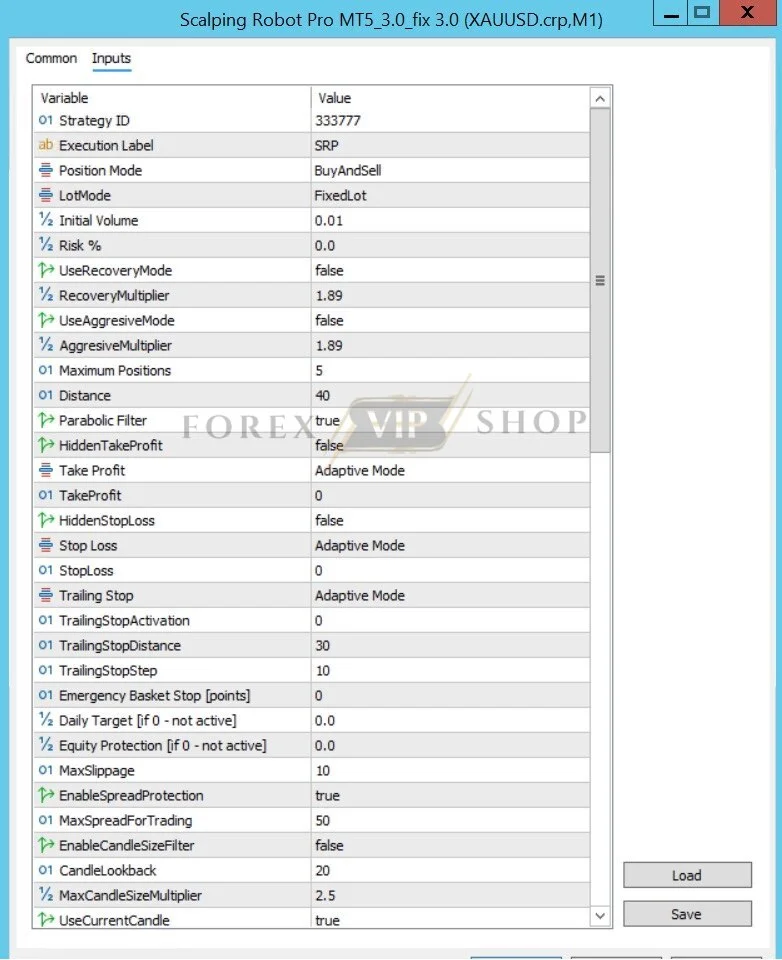
Settings Overview
| Parameter | Purpose | Effect on Trading | Risk Level |
| Lot Size | Controls position size | Directly affects profit and drawdown | High |
| Trade Direction | Buy Only, Sell Only, or Both | Filters market entries | Medium |
| Trading Schedule | Sets trading hours | Avoids unsuitable market sessions | Low |
| Session Filter | Restricts trading to active sessions | Improves execution quality | Low |
| News Filter | Blocks trades around major news | Reduces volatility risk | Low |
| Holiday Protection | Avoids holiday trading | Prevents low-liquidity trades | Low |
| Take Profit | Defines profit target | Influences average trade size | Medium |
| Stop Loss | Limits losses | Primary capital protection | High |
| Trailing Stop | Protects floating profits | Improves exit management | Medium |
| Daily Profit Protection | Stops after reaching profit target | Prevents overtrading | Low |
| Max Drawdown Protection | Halts trading after drawdown limit | Protects account equity | High |
| Maximum Positions | Limits simultaneous trades | Controls exposure | Medium |
| Equity Protection | Stops trading when equity threshold is reached | Helps preserve capital | High |
| Emergency Basket Stop | Closes multiple trades at a defined loss | Limits portfolio-wide risk | High |
| Adaptive Stop Loss | Adjusts stop distance automatically | Responds to changing volatility | Medium |
| Manual Stop Loss | Allows fixed stop configuration | Greater trader control | High |
These configurable options are described by the developer as part of the EA’s risk and trade management toolkit.
Detailed Settings Explanation
The Lot Size setting has the greatest impact on account performance. Increasing trade size raises potential returns but also increases drawdown. Conservative traders should prioritize consistent risk over aggressive position sizing.
The Trading Schedule and Session Filter allow the robot to trade during selected market hours. Gold often experiences higher liquidity during the London and New York sessions, making session filtering an important feature for scalping strategies. Community discussions around automated Gold scalpers also emphasize avoiding thin-liquidity periods and spread spikes.
The News Filter helps avoid high-impact economic releases that can produce unpredictable price swings. For fast scalping systems, skipping these events may reduce unnecessary losses.
Take Profit, Stop Loss, and Trailing Stop determine how trades are exited. While fixed targets provide consistency, trailing stops can lock in gains during extended moves. These settings influence profitability, trade duration, and overall drawdown.
Risk-control features such as Daily Profit Protection, Maximum Drawdown Protection, Equity Protection, and Emergency Basket Stop are designed to prevent excessive losses during unfavorable market conditions. These controls are most effective when combined with disciplined lot sizing rather than used as a substitute for good money management.
Trading Logic Analysis
Based on the available documentation, Scalping Robot Pro MT5 appears to be a Gold scalping EA with selective grid-based trade management. It focuses on rapid execution, short holding periods, configurable trading sessions, and automated risk controls rather than long-term trend following.
This design makes the EA suitable for traders who prefer frequent trading opportunities while maintaining predefined limits on exposure.
Risk Management
The developer recommends a minimum deposit of $1,000 and supports leverage ranging from 1:20 to 1:1000. The EA is compatible with Hedging, Netting, Standard, RAW, ECN, and Zero account types.
For practical use:
- Keep position sizes proportional to account equity.
- Use a low-spread broker for better execution.
- Run the EA on a VPS to minimize latency and connection interruptions.
- Monitor drawdown regularly instead of focusing only on short-term profits.
Many experienced MT5 users also recommend VPS hosting for scalping systems because execution speed can materially affect results.
How to Apply These Settings
- Install the EA in MetaTrader 5.
- Open an XAUUSD M1 chart.
- Enable AutoTrading.
- Attach Scalping Robot Pro MT5 to the chart.
- Set an appropriate lot size based on your account balance.
- Review session filters, news protection, and drawdown limits before going live.
- Test the configuration in the MT5 Strategy Tester before using a live account.
Optimization Tips
Experienced traders generally adjust lot size, trading hours, and daily risk limits first because these settings directly affect account exposure.
Settings such as the internal trading logic and optimized entry parameters are typically best left unchanged unless you have extensive forward-testing data. Over-optimizing an EA for historical performance can reduce its robustness in live markets.
During periods of elevated volatility, lowering risk or tightening drawdown limits may be preferable to increasing position size.
FAQs
01. What timeframe is recommended?
The EA is designed for the M1 timeframe.
02. Which trading pair is supported?
It is optimized specifically for XAUUSD (Gold).
03. Can I change the lot size?
Yes. Lot size is one of the primary user-configurable settings.
04. Is a VPS recommended?
Yes. Stable connectivity and low latency are beneficial for scalping strategies.
05. Should beginners modify all settings?
Generally, no. The developer indicates the default strategy is already optimized, with lot size and basic risk controls being the main settings users typically adjust.
06. Can it work with any broker?
The EA supports MT5 brokers, though low-spread accounts are recommended for best execution.
My Honest Idea After The Review
Based on its documented features, Scalping Robot Pro MT5 Settings are designed to balance fast Gold scalping with configurable risk management. The emphasis on session filters, news protection, drawdown controls, and automated trade management suggests a system intended for disciplined, short-term trading rather than aggressive optimization. Before using the EA on a live account, test the configuration in a demo or strategy tester, use conservative position sizing, and review the main product documentation for the latest updates and recommendations.
Useful Links
Contact us via Telegram: @FXVIPShop_Support