

Description
Wisdom EA MT4 Overview
Automated trading systems continue to attract traders who want to reduce screen time while maintaining consistent market participation. Among the many Expert Advisors available for MetaTrader 4, Wisdom EA MT4 has gained attention due to its structured trading approach, verified tracking records, and focus on controlled trade execution.
Based on available product information and public performance tracking, Wisdom EA MT4 appears to be designed around a combination of time-filtered trading, pending-order execution, volatility analysis, and layered risk management. Rather than chasing every market move, the EA focuses on specific trading windows and predefined market conditions.
This review examines how Wisdom EA MT4 works, its core trading logic, strengths, limitations, and whether it may fit your trading style.
➡️ Telegram: Join For NEW Updates & Settings
What Is Wisdom EA MT4?
Wisdom EA MT4 is an automated Forex trading robot developed for the MetaTrader 4 platform. The EA is designed to analyze market conditions, place trades automatically, manage open positions, and apply predefined risk controls without requiring manual intervention.
Unlike simple indicator-based robots, Wisdom EA MT4 incorporates multiple layers of filtering, including:
- Time-based trade execution
- Volatility analysis
- Pending order placement
- Multi-zone entries
- Trailing stop management
- Spread and slippage protection
- Money management controls
The goal is to improve entry precision while maintaining control over market exposure.
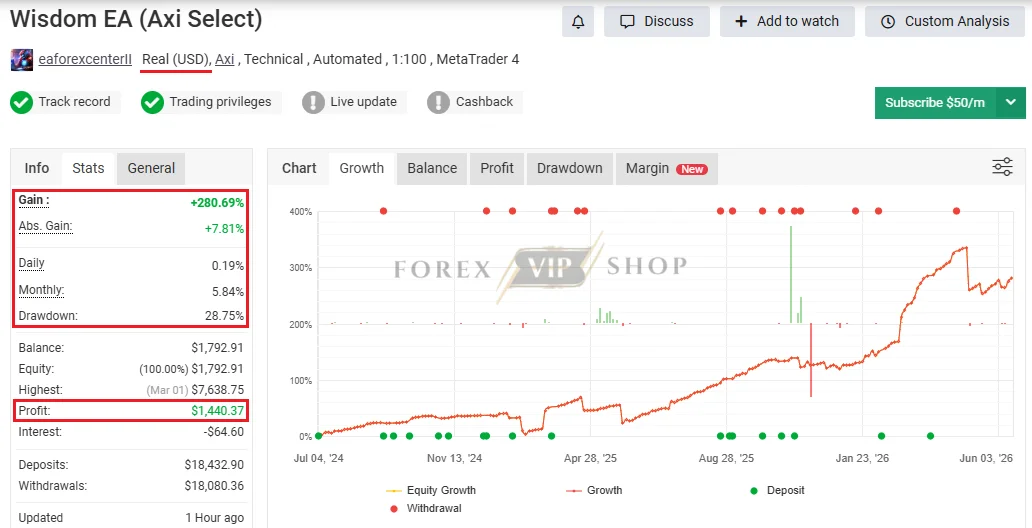
Wisdom EA (Axi Select) Myfxbook: Link
- Gain: +280.69%
- Profit: $1,440.37
- Drawdown: 28.75%
- Deposit: $18,432.90
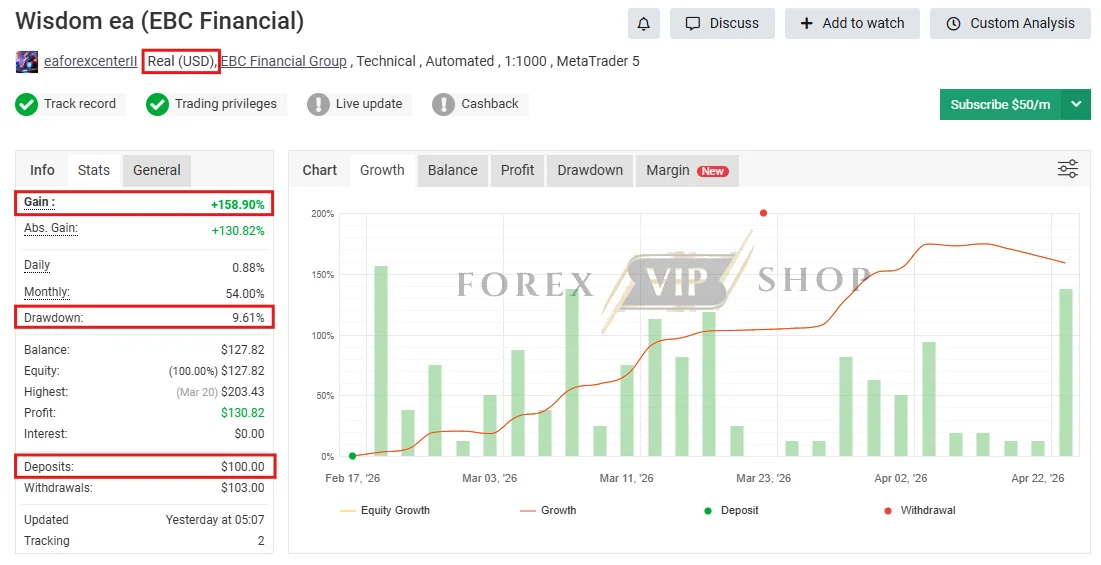
Wisdom EA MT4 (EBC Financial) Myfxbook: Link
- Gain: +109.58%
- Profit: $106.47
- Drawdown: 23.68%
- Deposit: $100
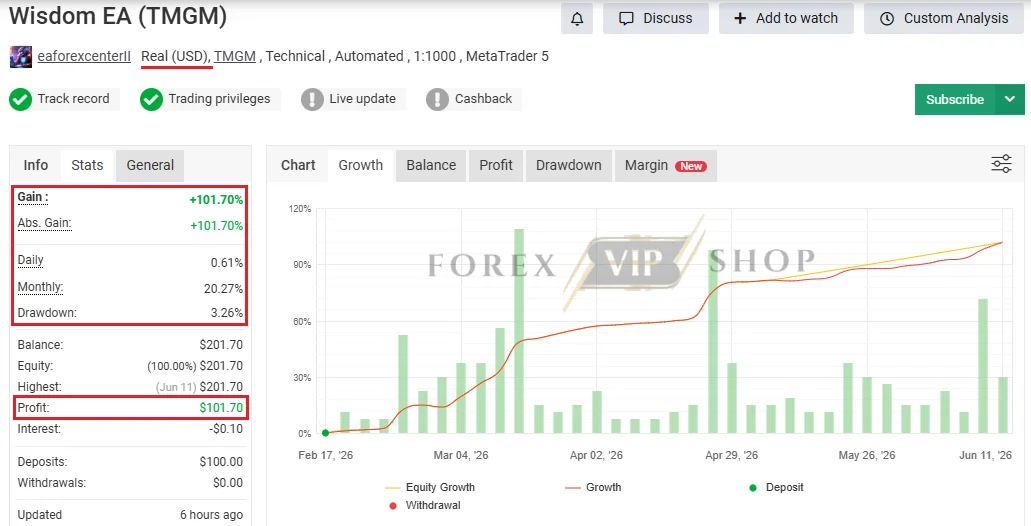
Wisdom EA MT4 (TMGM) Myfxbook: Link
Key Features
✅ Multi-Zone Entry System
The EA uses multiple trading zones to place pending orders at different price levels. This approach helps distribute entries rather than relying on a single market entry point.
✅ Volatility-Based Trading Logic
Market volatility influences trade decisions, helping the EA adapt to changing market conditions instead of using static parameters.
✅ Time-Based Trading Windows
Wisdom EA focuses on specific trading periods instead of trading continuously throughout the day.
✅ Automatic Trade Management
The system can manage entries, exits, trailing stops, and profit protection automatically.
✅ Spread & Slippage Filters
Trades can be filtered during unfavorable execution conditions, reducing the impact of excessive spreads and poor fills.
✅ Built-In Money Management
Risk allocation settings allow traders to adjust exposure according to account size and risk tolerance.
✅ Friday Trading Protection
Available settings indicate the EA can avoid trading on Fridays, potentially reducing exposure to weekend gap risk.
Specifications
| Specification | Information |
| Platform | MT4 |
| Trading Type | Fully Automated |
| Pairs | EURUSD, GBPUSD, AUDUSD |
| Minimum Deposit | $100 |
| Time Frame | M5, M15, H1 |
| Leverage | 1:30 |
| Risk Filter | Yes |
| Trailing Stop | Yes |
| Volatility Filter | Yes |
| Time Filter | Yes |
| VPS Required | Recommended |
| Broker Type | ECN Preferred |
How It Works
Wisdom EA MT4 follows a structured process:
Step 1: Market Analysis
The EA continuously monitors price movement and market volatility.
Step 2: Time Filter Check
Trades are only considered during predefined trading windows.
Step 3: Zone Identification
The system identifies potential entry zones where pending orders may be placed.
Step 4: Risk Verification
Spread, slippage, and volatility conditions are checked before order placement.
Step 5: Trade Execution
Pending orders are activated when price reaches target levels.
Step 6: Position Management
Trailing stops and profit-management rules help manage open positions automatically.
Trading Strategy Breakdown
One of the most interesting aspects of Wisdom EA MT4 is its layered entry model.
Multi-Zone Pending Order Strategy
Instead of entering immediately at market price, the EA places pending orders across different zones.
Potential benefits include:
- Improved average entry price
- Reduced slippage impact
- Better adaptation to market retracements
- More flexible trade positioning
Volatility Filtering
The EA appears to use volatility measurements to determine whether conditions are suitable for trading.
This can help avoid:
- Extremely quiet markets
- Excessively volatile periods
- Unstable execution environments
Session-Based Trading
Publicly available settings indicate a focus on a relatively narrow trading window around session transitions. Such periods can sometimes produce repeatable market behavior that algorithmic systems attempt to exploit.
Risk Management Features
No trading robot should be evaluated solely on profits. Risk management is often the deciding factor in long-term survival.
Wisdom EA MT4 includes several protective mechanisms:
Spread Protection
Helps avoid trades during costly market conditions.
Slippage Control
Attempts to prevent execution at unfavorable prices.
Dynamic Trailing Stops
Allows profitable trades to remain open while protecting gains.
Profit-Cutting Logic
Certain settings indicate automated profit-locking functionality.
Controlled Trading Schedule
Avoiding specific market periods may reduce unnecessary exposure.
Lot Management Controls
Allows traders to adjust risk based on account size and objectives.
Benefits for Traders
Reduced Screen Time
The EA handles analysis and execution automatically.
Structured Trading Process
Every trade follows predefined rules rather than emotional decision-making.
Consistent Execution
Rules are applied consistently across trading sessions.
Multiple Layers of Filtering
Time, volatility, spread, and risk filters may improve trade quality.
Useful for Busy Traders
Can be suitable for traders who cannot monitor charts throughout the day.
Installation Guide
Step 1: Download the Wisdom EA MT4 package.
Step 2: Open MetaTrader 4.
Step 3: Navigate to: File → Open Data Folder
Step 4: Copy the EA file into: MQL4 → Experts
Step 5: Restart MT4.
Step 6: Attach Wisdom EA MT4 to the recommended chart.
Step 7:
Enable:
- Auto Trading
- DLL Imports (if required)
- Live Trading Permissions
Step 8: Load the recommended settings file if provided.
Step 9: Monitor performance on a demo account before moving to live trading.
Who Is It Best For?
Suitable For
- Traders seeking automation
- MT4 users
- Traders with limited chart time
- Users comfortable with algorithmic trading
- Traders who prefer structured risk management
Final Verdict
Wisdom EA MT4 appears to be a thoughtfully designed automated trading system that combines several professional trading concepts into one package.
Its use of time-based trading windows, volatility filtering, pending-order execution, and layered risk management suggests a more structured approach than many basic Forex robots currently available.
The verified performance records indicate that the strategy has generated meaningful gains historically, although drawdowns remain a factor that traders must carefully consider. As with any EA, success will depend on broker conditions, account sizing, market environments, and realistic expectations.
For traders looking for an MT4 Expert Advisor that emphasizes controlled entries, automated trade management, and systematic execution, Wisdom EA MT4 is worth evaluating further through demo testing and proper risk management before deploying significant capital.
FAQs
01: What is Wisdom EA MT4?
Wisdom EA MT4 is an automated Forex trading robot designed for the MetaTrader 4 platform that executes trades based on predefined market conditions.
02: Is Wisdom EA MT4 fully automated?
Yes. It is designed to analyze markets, place trades, and manage positions automatically.
03: Does Wisdom EA use a grid strategy?
The EA appears to use a multi-zone pending-order approach. Traders should review current documentation to understand how position scaling is implemented.
04: Does it include stop-loss protection?
Yes, available settings indicate the use of stop-loss and trailing-stop management features.
05: What broker type is recommended?
Low-spread ECN brokers are generally preferred for automated trading systems.
06: Can beginners use Wisdom EA MT4?
Yes, although understanding risk management and MT4 operation is still important.
07: Is a VPS necessary?
Not mandatory, but highly recommended for stable 24-hour operation.
08: What drawdown can be expected?
Drawdown varies based on settings, account size, leverage, and market conditions. Historical tracking has shown drawdowns exceeding 20% on some accounts.
09: Can Wisdom EA MT4 guarantee profits?
No. No Forex EA can guarantee profits or eliminate risk.
10: Should I test it before trading live?
Yes. Running the EA on a demo account first is strongly recommended.
11: Does it trade every day?
Available settings suggest the EA uses specific trading schedules and may avoid Friday trading.
12: Is Wisdom EA MT4 suitable for prop firm accounts?
Suitability depends on the firm’s rules, drawdown limits, and the EA’s current trading behavior. Traders should verify compliance before use.
👉 Reviewed By: Michael Harrington
Direct Contact And More EAs
- Direct Contact- Telegram: FXVIPShop Support

Reviews
There are no reviews yet.