
Description
Institutional SMC Robot Eclipse MT5 Overview
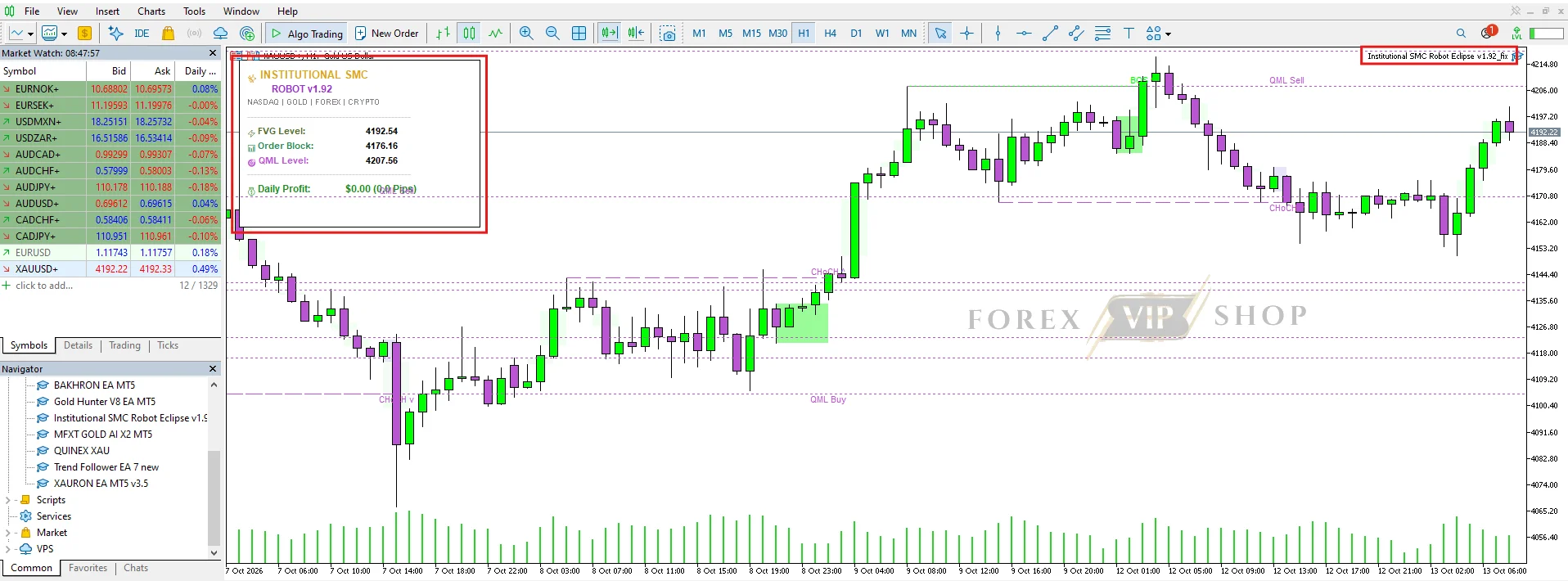
Institutional SMC Robot Eclipse MT5 is a MetaTrader 5 Expert Advisor designed to automate trading decisions using Smart Money Concepts (SMC), including Fair Value Gaps (FVG), Order Blocks and Quasimodo Levels (QML). According to the supplied product specifications, it targets gold, NASDAQ, major forex pairs and cryptocurrency CFDs, with M5–M15 recommended timeframes.
Its main attraction is automating price-action analysis without requiring traders to identify every setup manually. However, independently verified profitability and maximum drawdown figures for the exact Eclipse MT5 version have not been established.
➡️ Telegram: Join For NEW Updates & Settings
Key Features and Benefits
- Smart Money Concepts strategy: Uses FVG, Order Block and QML concepts to identify potential price-action opportunities. This may appeal to traders who prefer structure-based analysis over strategies relying entirely on conventional indicators.
- Multiple markets: The advertised instruments include XAUUSD, NASDAQ, EURUSD, GBPUSD, USDJPY and cryptocurrency CFDs. Actual availability depends on the broker’s symbol names and contract specifications.
- Automated execution: The EA is intended to reduce manual chart monitoring by automating its trading logic.
- Flexible operating conditions: The supplied specifications recommend M5–M15 charts and ECN/STP brokers, with trading across Asian, London and New York sessions.
- Lifetime updates and Telegram support: These are advertised benefits, although the precise update policy and support terms should be confirmed with the seller.
The key distinction is its SMC-based approach. Nevertheless, using institutional trading terminology does not prove that an algorithm accesses actual institutional order flow or consistently identifies profitable trades.
EA Specifications
| Parameter | Available information |
| Trading platform | MT5 only |
| Strategy | SMC, FVG, Order Blocks and QML |
| Pairs | XAUUSD (Gold), NASDAQ, EURUSD, GBPUSD, USDJPY and crypto CFDs (advertised) |
| Timeframe | M5–M15 |
| Trading sessions | Asian, London and New York (advertised) |
| Minimum recommended deposit | $100, according to supplied specifications |
| Broker type | ECN/STP recommended |
| Spread and commission limits | Not publicly verified for the Eclipse version |
| Leverage | Not specified in the available sources |
| VPS | Recommended for continuous operation |
| License | Unlimited account, as advertised |
| Updates and support | Free lifetime updates and Telegram support, as advertised |
| Maximum drawdown | Not independently verified |
| Grid or martingale | Not verified for the exact Eclipse version |
Important: The $100 deposit is a recommendation, not evidence that the EA can safely trade every advertised market at that balance. Gold and index contract sizes, minimum lots and stop distances can make small accounts particularly vulnerable.
How Does Institutional SMC Robot Eclipse MT5 Work?
The advertised strategy is built around three SMC concepts:
- Fair Value Gap (FVG): A price imbalance, commonly identified through a three-candle pattern, where price moved rapidly and left a gap between candle wicks.
- Order Block (OB): A price zone associated with a potential strong move. Traders watch these zones for possible support, resistance or retracement entries.
- Quasimodo Level (QML): A reversal structure based on a particular sequence of swing highs and lows.
An SMC trading system may combine these zones with market-structure signals to determine when a trade is worth considering. However, the exact Eclipse MT5 rules for entry confirmation, stop-loss placement, take-profit calculation and trade exits have not been independently established from the available evidence.
Similarly, it is not publicly verified whether this specific version uses grid trading, martingale, averaging or hedging. Buyers should request the EA documentation rather than assume these risks are absent.
Performance and Testing Evidence
Performance evidence is one of the most important factors to check before purchasing an automated trading system.
The supplied product page advertises SMC-based automation but does not provide independently verified performance figures in the material reviewed. Its claims should therefore be treated as product information, not proof of profitability.
A separately listed product called Institutional SMC Robot appears on the MQL5 Market. That listing describes similar SMC concepts and displays live-signal links, but it is not established that this is the same product or version as Institutional SMC Robot Eclipse MT5. Its results should not be attributed to Eclipse without confirmation.
Before relying on any performance claims, check:
- Whether a live account statement can be independently verified.
- The length of the trading record and whether it covers different market conditions.
- Maximum equity drawdown, not just closed-trade losses.
- Average trade costs, losing streaks and exposure to simultaneous positions.
- Whether the tested settings match the version and broker you intend to use.
A backtest is useful for assessing historical behaviour, but it cannot guarantee future results. Demo forward testing is an essential next step.
Risks and Important Considerations
Execution costs: M5–M15 systems can be sensitive to spreads, commissions and slippage. A strategy that looks profitable before trading costs may perform differently on a live account, particularly during news releases or rapid moves in gold and NASDAQ.
Market volatility: FVGs and Order Blocks are analytical concepts, not guarantees of reversals. Price can move through a marked zone without reacting, especially during strong trends or unexpected economic announcements.
Stop-loss protection: The exact Eclipse version’s stop-loss rules and protection against extreme account losses are not independently verified. Confirm whether every position has a stop-loss, how it is calculated and whether account-level loss limits are available.
Multi-market exposure: Running the EA on several instruments can increase total risk. Gold, NASDAQ and cryptocurrency CFDs may experience sharp moves at the same time, so using each chart independently does not necessarily diversify the account.
Small-account limitations: A $100 balance may leave little room for drawdown, commissions and minimum lot-size constraints. Start with conservative risk settings and avoid enabling every advertised market simultaneously.
Pros and Cons
Pros
- Automates an SMC-based approach.
- Advertised multi-market support.
- MT5 integration.
- Lifetime updates advertised.
- Telegram support advertised.
Cons
- Eclipse-specific live results unverified.
- Exact entry and exit rules unclear.
- Grid, martingale and hedging status unknown.
- Execution costs may affect short-timeframe trades.
- A $100 balance may be restrictive.
Who Is This EA Suitable For?
Institutional SMC Robot Eclipse MT5 may be worth investigating if you:
- Already use MetaTrader 5 and understand automated trading.
- Want to explore systematic SMC strategies rather than identify every setup manually.
- Can access suitable ECN/STP execution and monitor trading costs.
- Are willing to test the EA and inspect its trade history before committing real money.
It is less suitable for beginners expecting guaranteed profits, traders who cannot tolerate substantial losses, or anyone who needs verified low-drawdown performance before buying.
Installation and Setup Guide
The general MT5 installation process is straightforward, but follow the product-specific instructions supplied with your purchase.
- Download the EA file and any supplied .set presets.
- Open MT5 and select File → Open Data Folder.
- Navigate to MQL5 → Experts and place the EA file there if the seller provides a standard installable file.
- Refresh the Navigator panel or restart MT5.
- Attach the EA to the intended chart and review its Inputs.
- Enable algorithmic trading only after checking the settings and required permissions.
- Run a Strategy Tester backtest and then demo forward testing before considering a live account.
Setup advice: Begin with one instrument, confirm the correct symbol and timeframe, and use conservative position sizing. A VPS can help maintain connectivity, but it cannot prevent trading losses or broker execution problems.
FAQs
01. Does Institutional SMC Robot Eclipse MT5 work on MT4?
No MT4 compatibility is advertised. The product is presented as an MT5 Expert Advisor, so use a compatible MetaTrader 5 terminal.
02. What is the minimum deposit?
The supplied specifications recommend $100. This should not be interpreted as a safe minimum for every instrument or broker. Confirm minimum lot sizes, margin requirements and the intended risk per trade first.
03. Which broker is best?
The supplied specifications recommend an ECN/STP broker. Compare actual spreads, commissions, execution quality, slippage and the availability of the exact symbols the EA supports. No particular broker’s compatibility has been independently verified here.
04. Does it use martingale or grid trading?
That is not verified for the exact Eclipse version. Ask the seller for documentation confirming its position-sizing and recovery logic before using real money.
05. Are the results profitable, and what is the maximum drawdown?
No independently verified profitability or maximum drawdown figure has been established for this exact version. Request a verifiable live record and test the EA using your intended broker conditions.
06. Does the purchase include lifetime updates?
Free lifetime updates and Telegram support are advertised in the supplied listing. Confirm the licence, update delivery process and support terms before purchasing.
Final Buying Guidance
Institutional SMC Robot Eclipse MT5 offers an appealing concept for traders who want to automate Fair Value Gap, Order Block and QML analysis on MT5. Its advertised multi-market coverage, lifetime updates and Telegram support may also interest buyers looking for a flexible SMC-based system.
The main limitation is the lack of independently verified performance evidence for the exact Eclipse version, alongside unanswered questions about its detailed risk controls and position-management methods.
Our recommendation: Review the product listing and available purchase information, request the full settings documentation, and test the EA on a demo account before committing real funds. Buy based on verifiable features and acceptable risk—not the promise of institutional-style trading alone.
👉 Reviewed By: Michael Harrington
Direct Contact And More EAs
- Direct Contact- Telegram: FXVIPShop Support

Reviews
There are no reviews yet.