
Description
Hedge Scalper MT4 Review
Finding an MT4 EA that can handle both profitable and difficult market conditions is not easy.
Scalping systems can struggle when spreads widen, while traditional trend-following robots can suffer badly when the market suddenly reverses.
That is where Hedge Scalper MT4 takes a different approach. It combines scalping with hedging and is designed to trade multiple currency pairs rather than relying on one market alone.
During my review, the part that caught my attention was its focus on managing losing positions through hedging rather than simply relying on a conventional stop-loss approach.
However, that also makes risk management extremely important. A hedging EA can keep positions open for longer, so traders should understand how the system behaves before putting real money behind it.
➡️ Telegram: Join For NEW Updates & Settings
➡️ Vendor’s Website: Here
What Is Hedge Scalper MT4?
Hedge Scalper MT4 is an automated Forex trading system built for MetaTrader 4.
Its core approach combines two techniques:
- Scalping short-term market movements
- Hedging positions when trades move against the system
- Monitoring multiple currency pairs
- Prioritizing pairs based on market conditions
- Attempting to reduce accumulated drawdown
- Avoiding certain high-volatility situations
The developer describes the system as capable of cross-pair hedging, meaning the EA can potentially use another currency pair to help manage exposure elsewhere.
That makes it different from a simple one-pair scalping robot.
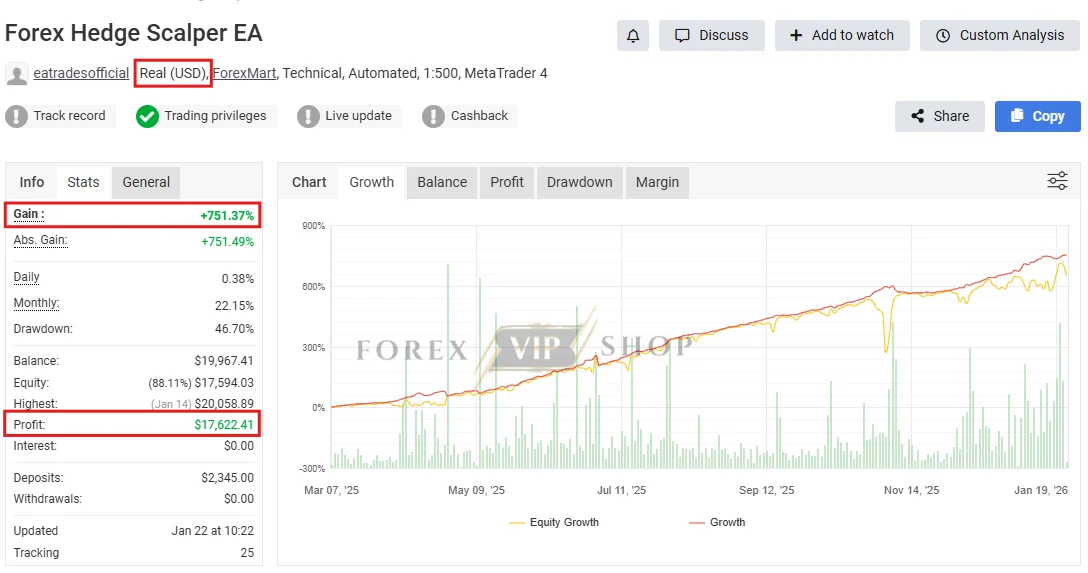
Hedge Scalper EA MT4 Myfxbook Real Account: Live Link
- Gain: +751.37%
- Profit: $17,622.41
- Deposit: $2,345.00
My Testing & Review Experience
When reviewing an EA like this, I pay more attention to its trading logic than screenshots showing large account balances.
What I observed from the available strategy documentation is that Hedge Scalper MT4 is not designed simply to open a trade, wait for a small profit, and immediately close it.
The system can initially trade according to market direction. If the market moves against an entry, the hedging component can become involved.
It can then use additional positions and, according to the developer’s documentation, potentially cross-hedge between different currency pairs.
This is important because it changes the risk profile.
A system that manages losing trades through hedging may look smoother during certain market conditions, but floating drawdown can still become substantial during persistent or unusual moves.
One real-world example is particularly useful. A recent customer review published by EA Trades described an account reaching approximately 50% drawdown during a strong trend before subsequently recovering.
I would not interpret that as proof that the EA will behave the same way for every trader. Instead, it highlights exactly why I would test this system on demo first.
How the Hedge Scalper Strategy Works
The basic process can be understood in five stages.
1 Market entry:
The EA identifies a trading opportunity and opens a position.
2 Position monitoring:
If the market moves favorably, the trade can be closed for a relatively small gain.
3 Hedging:
If the market moves against the position, the EA can use hedging logic to manage exposure.
4 Scalping:
The system can attempt to capture smaller market movements while managing existing positions.
5 Drawdown management:
The EA has dedicated logic intended to reduce accumulated drawdown and manage losing orders.
The developer has also documented Smart Drawdown Control with different approaches ranging from stricter drawdown reduction to more relaxed settings.
Key Features
✅ Hedging and scalping combined
✅ Multi-pair Forex trading
✅ Cross-pair hedging functionality
✅ Automated market analysis
✅ Spread filtering
✅ News-avoidance logic
✅ Trend filtering
✅ Drawdown-management functions
✅ 24/5 automated operation
✅ MT4 compatibility
✅ Lifetime updates according to the supplied product brief
The developer has continued releasing updates during 2026, including a Hedge Scalper update in April 2026.
Hedge Scalper MT4 Specifications
| Specification | Details |
| Platform | MetaTrader 4 |
| Strategy | Hedging + Scalping |
| Currency Pairs | GBPUSD, EURUSD, GBPNZD, USDJPY, USDCHF, AUDUSD, NZDUSD |
| Timeframe | M1 to D1 |
| Recommended Deposit | $100 according to supplied product brief |
| Broker Environment | ECN/STP, tight spreads, low commission |
| Leverage | 1:400+ according to current EA Trades requirements |
| Live Operation | 24/5 |
| VPS | Recommended |
| License | Unlimited account according to supplied brief |
| Updates | Free lifetime according to supplied brief |
| Support | Telegram support |
Important: the developer’s current public page recommends $1,000 or more for safer operation, while stating that $500 can be used with higher risk. I would therefore treat $100 as a minimum supplied specification, not as a conservative live-trading recommendation.
Performance Observations
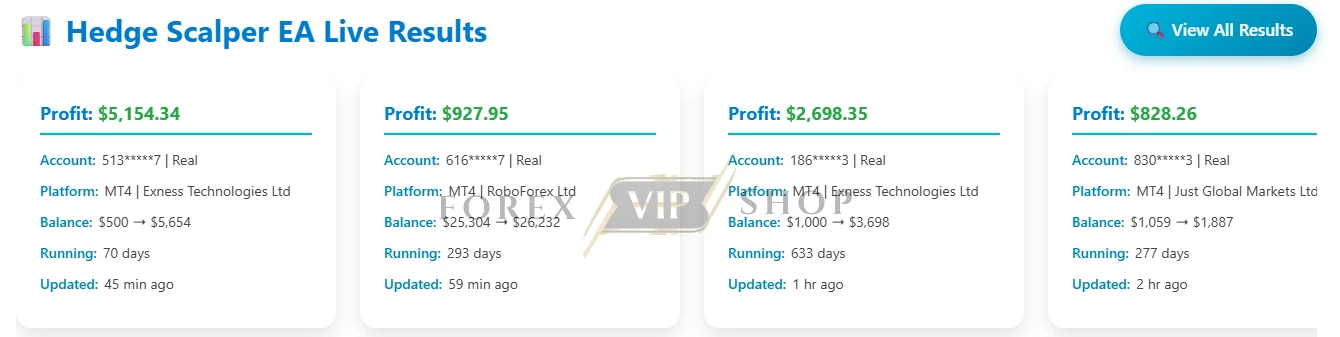
The available live-results information shows both MT4 and MT5 accounts, including real and demo accounts.
I would still avoid judging the EA from headline profit numbers alone.
With a hedging system, the more useful questions are:
- How large does floating drawdown become?
- How long can losing baskets remain open?
- How does the EA behave during persistent trends?
- What happens when spreads widen?
- How much margin is required?
- Does the broker allow the required hedging approach?
Those factors matter considerably more than a single profitable account screenshot.
Risk Management & Drawdown Analysis
This is the section I would take most seriously.
Hedging does not make trading risk-free. It can change how losses are managed, but open positions still consume margin.
The EA’s documentation includes Smart Drawdown Control and an equity-level protection mechanism designed to stop trading or close positions once a predefined equity threshold is reached.
However, traders should not assume these features eliminate drawdown.
My preference would be to start with conservative settings, use a properly regulated broker environment, and monitor the account’s equity drawdown rather than balance alone.
I would also avoid running the EA aggressively on a very small live account simply because a low starting deposit is technically possible.
Pros and Cons
Pros
- Combines hedging and scalping
- Supports multiple major and cross currency pairs
- Includes drawdown-management features
- Spread and news filters can help avoid unfavorable conditions
- Designed for continuous automated operation
- MT4 remains widely supported by Forex brokers
- Current versions continue to receive updates
Cons
- Hedging can create significant floating drawdown
- Requires careful margin management
- Persistent trends can challenge the strategy
- Higher leverage requirements increase risk
- Multi-pair trading makes exposure harder for beginners to understand
- A $100 starting balance should not be confused with a conservative capital requirement
Who Should Use Hedge Scalper MT4?
I would consider it for traders who:
- Understand hedging and floating drawdown
- Want a multi-pair automated trading system
- Have access to an MT4 ECN/STP broker
- Can provide adequate margin
- Are comfortable monitoring an automated strategy
- Have the patience to demo-test the EA before going live
It may be particularly interesting for traders who prefer automated strategies that do more than simply use fixed stop-loss and take-profit rules.
Who Should Avoid It?
I would avoid this EA if you are expecting guaranteed low drawdown or instant profits.
It is also not something I would recommend blindly for beginners with extremely small accounts.
Traders who dislike floating positions or cannot tolerate extended drawdown may be more comfortable with a simpler fixed-risk EA.
Installation & Setup Guide
01. Install MT4:
Install MetaTrader 4 and log into your trading account.
02. Add the EA:
Copy the Hedge Scalper MT4 files into the appropriate Experts folder.
03. Enable automated trading:
Make sure AutoTrading is enabled.
04. Configure the broker connection:
Use an ECN/STP environment with tight spreads and suitable execution.
05. Run a demo test:
Allow the EA to operate through different market conditions before considering live trading.
06. Use a VPS:
A stable VPS is recommended for continuous 24/5 operation.
If the licensed version remains stuck on “Validating License,” the developer says MT4 must allow WebRequest access to its licensing server.
My Opinion After The Experience
Hedge Scalper MT4 is an interesting automated trading system because it does not rely on conventional scalping alone.
Its combination of hedging, cross-pair management, scalping and drawdown controls gives it a broader strategy framework than a basic MT4 scalper.
However, I would not describe it as a low-risk EA.
The ability to hedge losing positions can be useful, but it can also mean trades remain open and consume margin during difficult market conditions.
For me, the sensible approach is simple: demo test it first, use conservative risk settings, and judge the system by drawdown and consistency rather than headline profits.
If those tests match your risk tolerance, Hedge Scalper MT4 is certainly worth considering.
FAQs
01. Is Hedge Scalper MT4 suitable for beginners?
It can be used automatically, but beginners should understand hedging, leverage, margin and drawdown before using it with real money.
02. What currency pairs does Hedge Scalper MT4 support?
The supplied configuration includes GBPUSD, EURUSD, GBPNZD, USDJPY, USDCHF, AUDUSD and NZDUSD.
03. Does Hedge Scalper MT4 use hedging?
Yes. Hedging is one of its central trading components, and the developer also describes cross-pair hedging functionality.
04. Does it require a VPS?
A VPS is recommended for continuous operation. The developer currently describes a stable VPS as a requirement for running the system continuously.
05. Can I run Hedge Scalper MT4 with $100?
The supplied product information lists $100 as the recommended minimum. However, the developer’s current public documentation recommends $1,000 or more for safer operation, with $500 described as higher risk.
06. What leverage does Hedge Scalper MT4 require?
The current EA Trades documentation states that the EA requires at least 1:400 leverage.
07. Does Hedge Scalper MT4 guarantee profits?
No. Like every automated trading system, it is exposed to market risk, drawdown, execution conditions, spreads and changing market behavior.
👉 Reviewed By: Michael Harrington
Direct Contact And More EAs
- Direct Contact- Telegram: FXVIPShop Support

Reviews
There are no reviews yet.