

Description
EA Legendary Scalper MT4 Review
Trading gold and cryptocurrencies manually can be demanding. Volatility changes quickly, spreads can widen, and breakout opportunities may appear and disappear within minutes.
That is where an automated trading system such as EA Legendary Scalper MT4 attempts to help. It is designed for MetaTrader 4 and focuses on breakout trading across XAUUSD, BTCUSD, and ETHUSD on the M30 timeframe.
From the specifications and published product information I reviewed, the EA combines breakout detection with multiple filters, adaptive stops, spread controls, and configurable risk-management features.
The important question is not whether an EA sounds advanced. It is whether its trading logic, execution requirements, and risk controls fit your account and broker environment.
➡️ Telegram: Join For NEW Updates & Settings
➡️ Vendor’s Website: Here
What Is EA Legendary Scalper MT4?
EA Legendary Scalper MT4 is an automated breakout/scalping Expert Advisor developed specifically for MetaTrader 4.
The recommended markets are:
- XAUUSD — M30
- BTCUSD — M30
- ETHUSD — M30
The published documentation describes dynamic support/resistance detection, volatility and volume filtering, and additional pattern validation before entries. The product also states that it does not use Martingale, Grid, or increasing-lot strategies.
That last point is particularly relevant because aggressive lot escalation is one of the common risk factors I look for when reviewing automated trading systems.
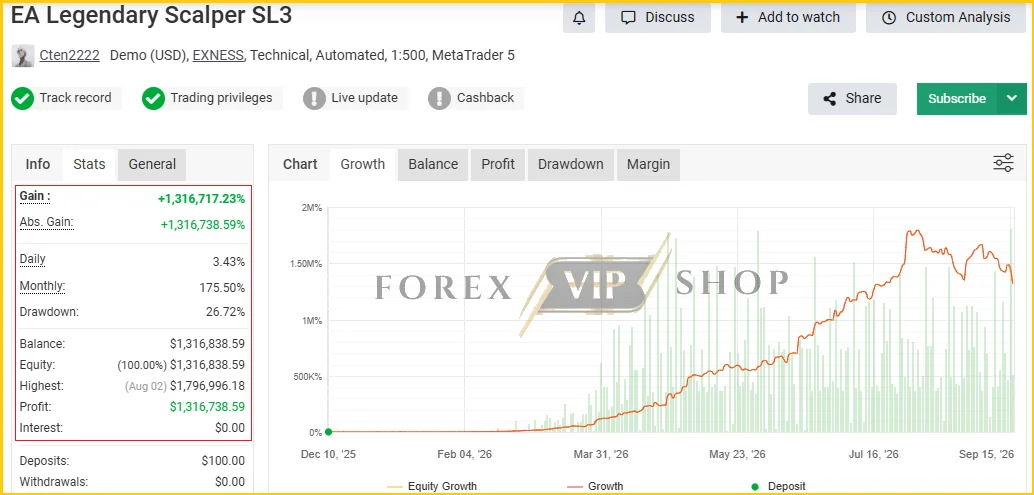
EA Legendary Scalper MT4 Myfxbook Review: Live Link
- Gain: +1,316,717.23%
- Profit: $1,316,738.59
- Drawdown: 26.72%
- Deposit: $100.00
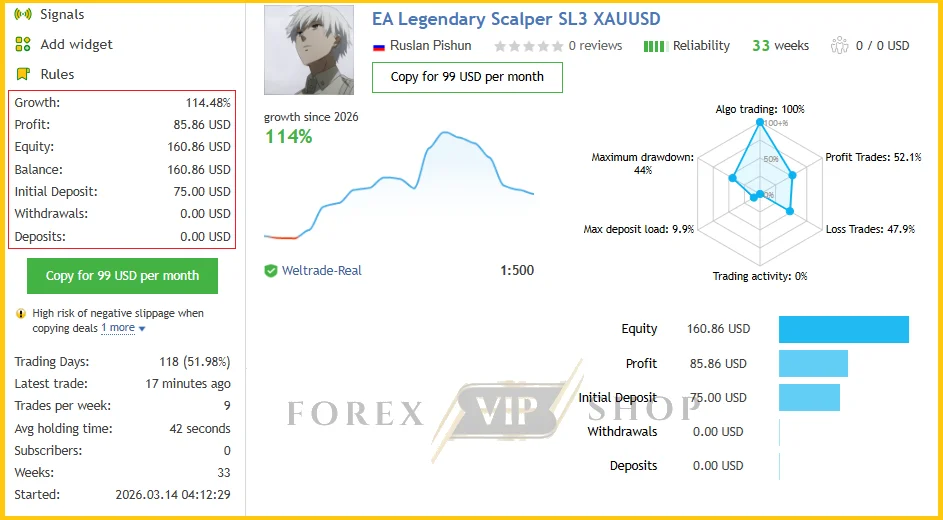
EA Legendary Scalper Live Signal MQL5: Live Link
- Growth: 114.48%
- Profit: 85.86 USD
- Drawdown: 44%
- Deposit: 75.00 USD
My Review of the Trading Experience
Rather than judging an EA purely from headline backtests, I look first at how it is supposed to behave in real trading conditions.
What stands out with EA Legendary Scalper MT4 is the amount of control available to the trader.
There are settings for maximum spread, slippage, fixed lots, percentage-based risk management, free-margin control, daily profit limits, daily order limits, adaptive stops, breakeven, trailing stops, and trading schedules.
That gives the trader considerably more control than a basic “attach it and forget it” robot.
The broker environment is also important. The developer specifically recommends low spreads and a VPS with low latency to the broker. The published requirements support leverage from 1:100 to 1:500, with 1:500 listed as the recommendation.
I would therefore treat execution quality as part of the EA setup rather than an afterthought.
How Does the Strategy Work?
The basic concept is relatively easy to understand.
The EA looks for important price levels and attempts to trade confirmed breakouts rather than entering randomly.
According to the published strategy description, the system uses:
- Dynamic price levels — recent market structure is used to identify potential breakout zones.
- Breakout confirmation — price must move through an important level.
- Volatility filters — market conditions are considered before an entry.
- Volume filters — tick-volume conditions can be used to restrict trading.
- Pattern filtering — the product documentation describes historical-pattern/neural filtering as part of the validation process.
- Adaptive trade management — stop loss, take profit, breakeven and trailing mechanisms can adapt to market conditions.
In simple terms, the idea is to avoid treating every price breakout as a trade opportunity.
Key Features
✅ M30 breakout trading for XAUUSD, BTCUSD and ETHUSD.
✅ Adaptive stops covering stop loss, take profit, breakeven and trailing functions.
✅ Spread protection with maximum-spread controls and the ability to temporarily disable trading when spreads become excessive.
✅ Risk management through fixed lots or percentage-based RiskMM.
✅ Free-margin protection to help manage pending-order requirements.
✅ Daily trading limits for both profit and number of orders.
✅ Trading schedule controls for individual weekdays, intraday hours and Friday shutdown.
✅ No Martingale/Grid approach, according to the published product specifications.
EA Legendary Scalper MT4 Specifications
| Specification | Details |
|---|---|
| Platform | MetaTrader 4 |
| Timeframe | M30 |
| Currency Pairs | XAUUSD (Gold), BTCUSD, ETHUSD |
| Minimum / Recommended Deposit | $100 |
| Leverage | 1:100–1:500 |
| Recommended Leverage | 1:500 |
| Account Type | Any |
| Strategy | Breakout / scalping |
| Product Type | NoDLL / Unlimited / Unlocked |
| Broker Environment | Low-spread environment recommended |
| VPS | Low-ping VPS recommended |
| Trading Mode | Automated |
The $100 figure should be viewed as a minimum recommended starting balance, not a guarantee that the account will remain safe under all market conditions.
Performance Observations
Published results provide some interesting numbers, but they should be interpreted carefully.
One published real-account result reports an initial balance of $103, growth of 267%, and maximum drawdown of 13.2% over 14 consecutive weeks. Another published result reports $75 initial capital, 90% growth, and 18.8% maximum drawdown over eight weeks.
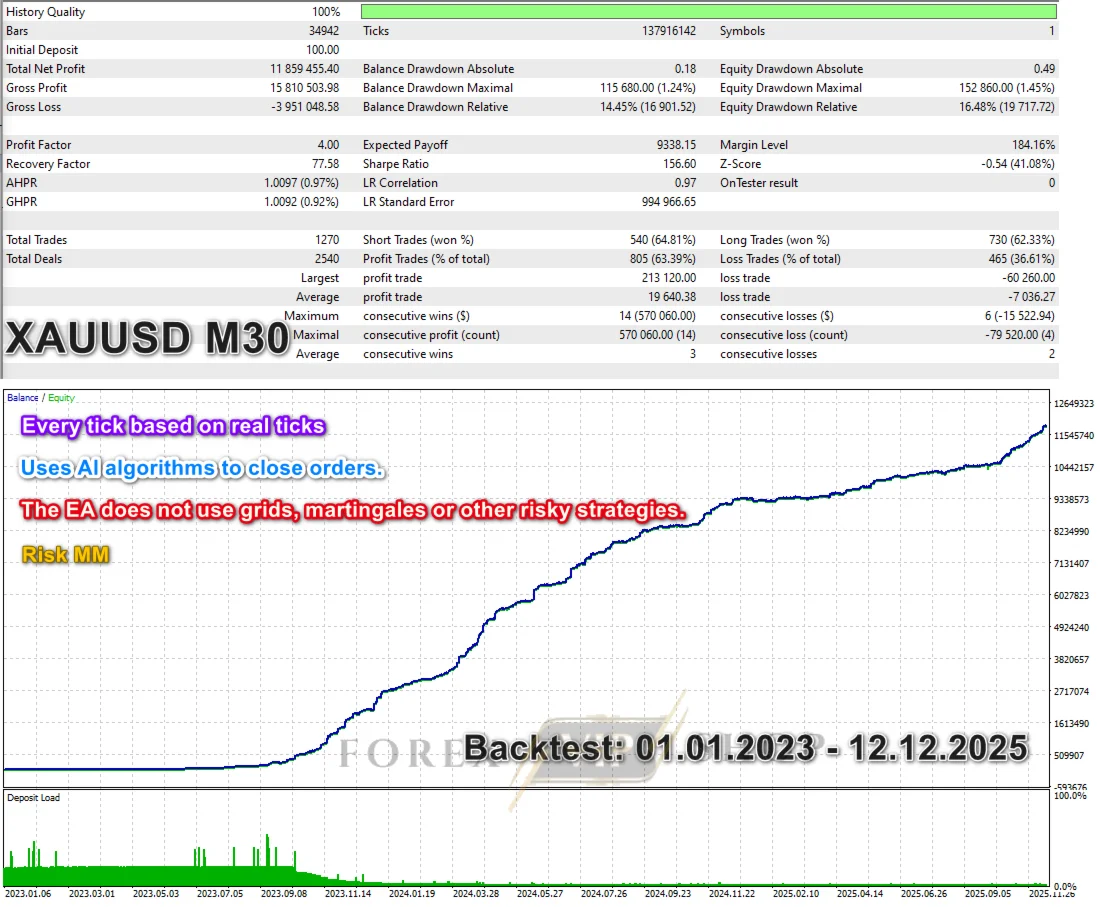
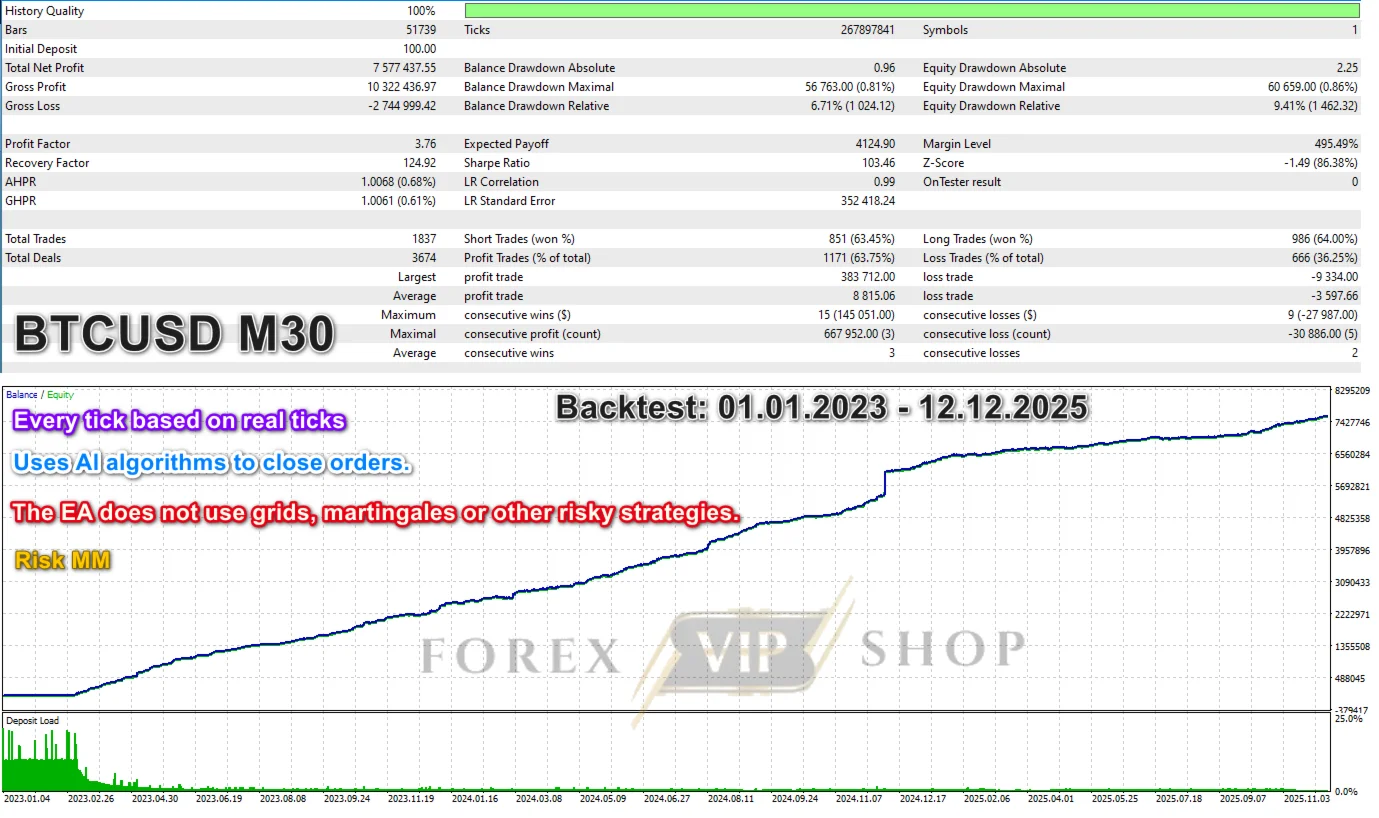
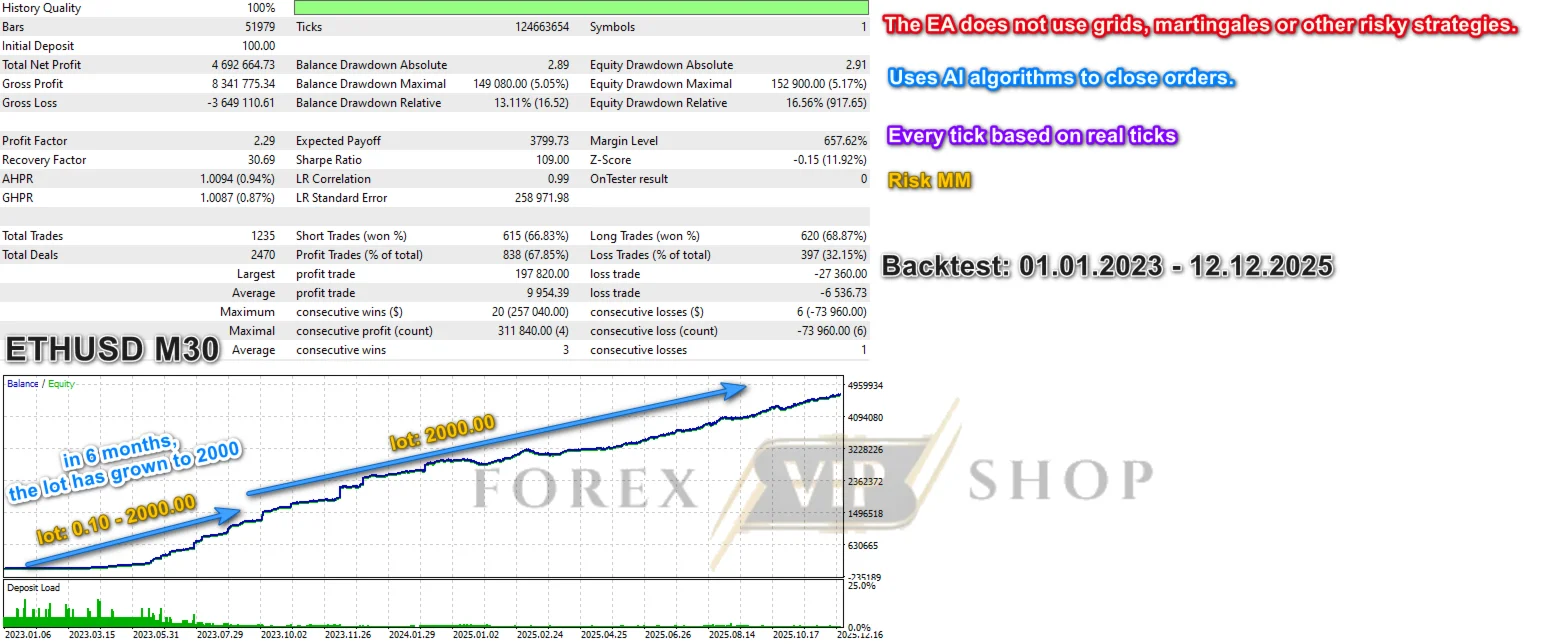
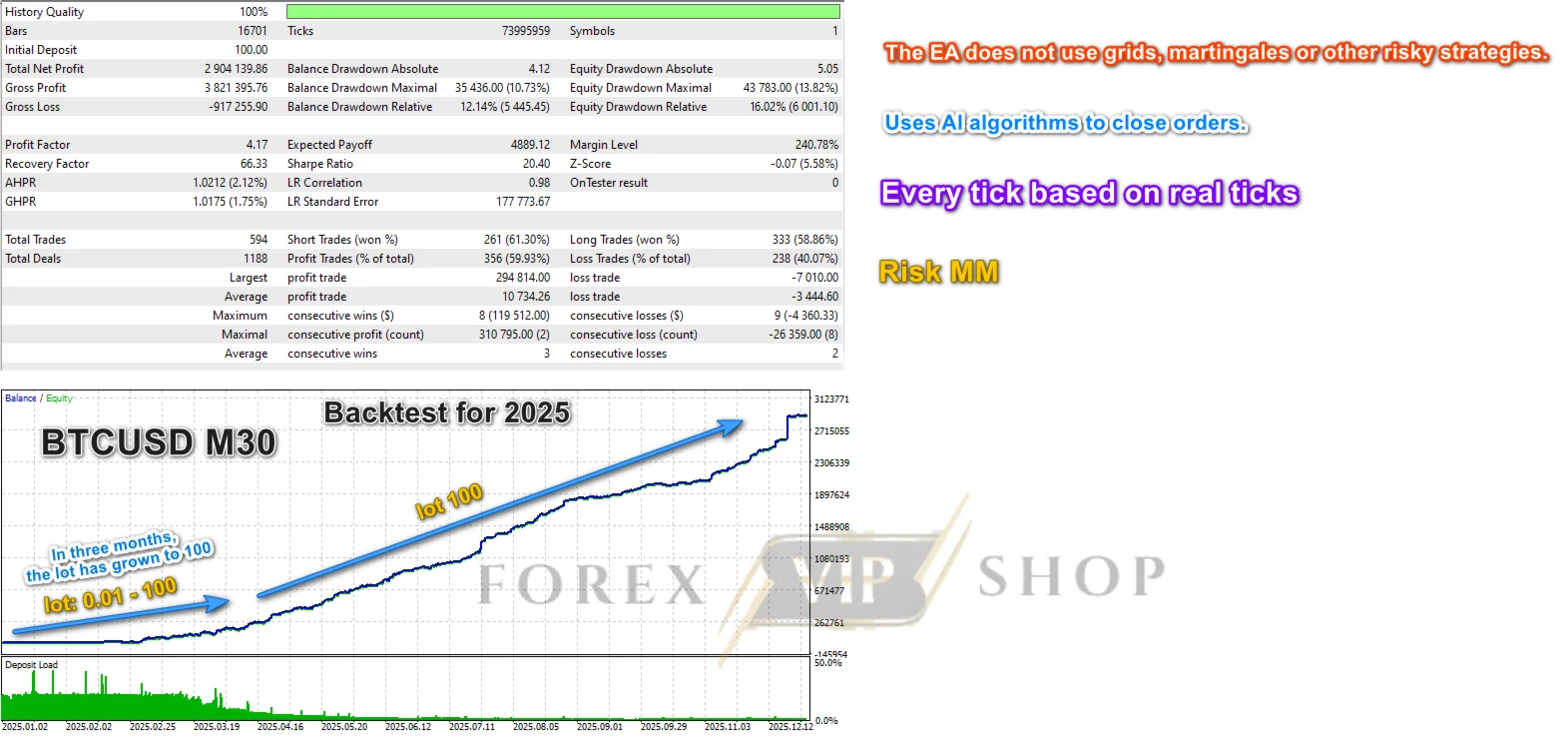
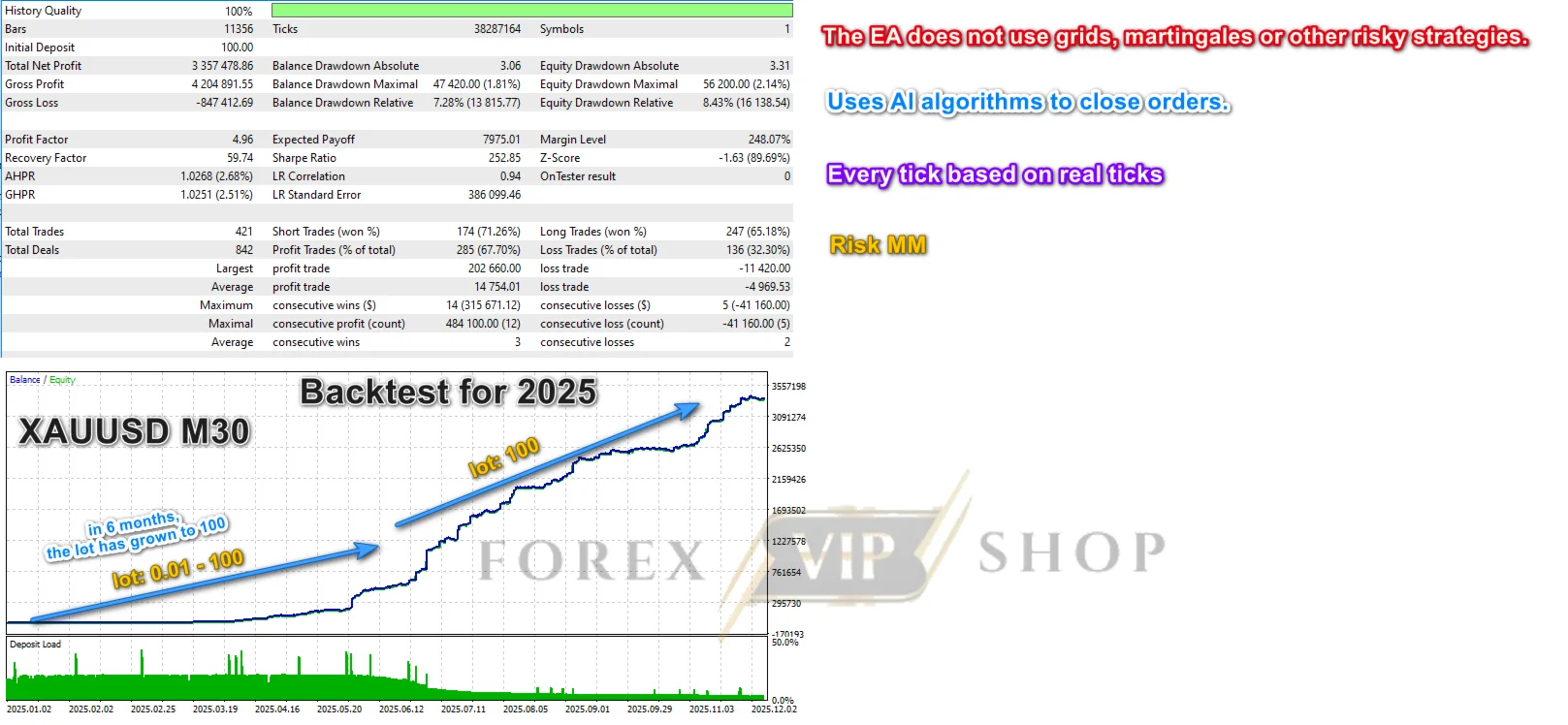
The same source also publishes historical backtests showing very large net-profit figures on BTCUSD and XAUUSD. However, backtest results can differ substantially from live execution because of spreads, slippage, liquidity, data quality and market conditions.
For that reason, I would not use the headline backtest profit as the main reason to buy this EA.
The more useful questions are whether the broker offers suitable spreads, whether execution is reliable, and whether the chosen risk settings fit the account.
Risk Management & Drawdown
This is one of the stronger areas of the EA’s configuration.
You can choose between Fixed_Lot and RiskMM, while percentage-risk settings allow the trader to define the intended risk level.
There are also controls for:
- Maximum spread
- Slippage
- Free margin
- Adaptive stop management
- Breakeven
- Trailing stop
- Daily profit limits
- Maximum daily orders
- Trading hours
- Friday shutdown
These controls do not eliminate market risk. Gold and crypto can move sharply, and execution during volatile periods can differ from historical testing.
For a first deployment, I would use a demo account or very conservative risk settings, then monitor actual spread, slippage and drawdown before increasing exposure.
Pros and Cons
Pros
- Designed specifically for MT4.
- Supports gold and major crypto markets.
- Uses M30 charts rather than ultra-fast M1 execution.
- Extensive risk-management controls.
- Adaptive stop-management options.
- Spread protection features.
- No Martingale or Grid strategy according to published specifications.
- Supports fixed-lot and percentage-risk approaches.
Cons
- Limited to three primary recommended instruments.
- Performance depends heavily on broker spreads and execution.
- XAUUSD, BTCUSD and ETHUSD can experience substantial volatility.
- The $100 minimum balance is relatively small for volatile markets.
- Published backtests should not be treated as expected live returns.
- A VPS and suitable execution environment are strongly recommended.
Who Should Use EA Legendary Scalper MT4?
This EA may be worth considering for traders who:
- Already use MetaTrader 4.
- Prefer automated breakout trading.
- Want exposure to gold and crypto markets.
- Understand leverage and drawdown.
- Are comfortable monitoring an automated trading system.
- Want detailed control over risk and trading schedules.
Who Should Avoid It?
I would be cautious if you:
- Expect guaranteed monthly profits.
- Have no understanding of drawdown.
- Plan to use extremely high risk on a small account.
- Trade with consistently high spreads.
- Cannot monitor the EA during its initial deployment.
- Expect an EA to work identically across every broker.
Installation & Setup Guide
- Install MetaTrader 4 with your chosen broker.
- Copy the EA file into the MT4
Expertsfolder. - Restart MT4 or refresh the Navigator window.
- Open XAUUSD, BTCUSD or ETHUSD on M30.
- Attach EA Legendary Scalper MT4 to the chart.
- Enable automated trading and configure the recommended settings.
- Check the broker’s spread and execution conditions.
- Start with demo testing before moving to a live account.
If multiple EAs are running on one account, use different Magic Numbers. The developer also recommends dedicating a separate account and MT4 terminal to one EA where possible.
My Opinion After Reviewing EA Legendary Scalper MT4
EA Legendary Scalper MT4 has a more comprehensive configuration structure than a simple breakout robot.
The combination of breakout logic, spread protection, adaptive stops, volume controls and risk-management options makes the system interesting for traders who understand automated trading and want more control over how the EA operates.
However, I would not judge it solely from its impressive published backtests or short-term live results. The recommended markets are volatile, and execution quality can materially affect automated trading.
My practical approach would be to demo test first, verify the broker’s spreads and execution, monitor drawdown, and only then consider live deployment.
That makes EA Legendary Scalper MT4 a product worth considering—but the final suitability depends heavily on your broker, account size, risk settings and trading objectives.
FAQs
01. What is EA Legendary Scalper MT4?
EA Legendary Scalper MT4 is an automated breakout/scalping Expert Advisor designed for MetaTrader 4 and recommended for XAUUSD, BTCUSD and ETHUSD on M30.
02. What timeframe does EA Legendary Scalper MT4 use?
The recommended timeframe is M30, or the 30-minute chart, for the supported instruments.
03. What pairs does EA Legendary Scalper MT4 trade?
The recommended pairs are XAUUSD, BTCUSD and ETHUSD.
04. What is the minimum deposit?
The published minimum recommended balance is $100. However, traders should consider volatility and their chosen risk settings before deciding how much capital to allocate.
05. Does EA Legendary Scalper MT4 use Martingale?
According to the published product information, it does not use Martingale, Grid, or other strategies based on increasing lot sizes.
06. What leverage does the EA support?
The stated leverage range is 1:100 to 1:500, with 1:500 listed as the recommended leverage.
07. Is a VPS recommended?
Yes. The developer recommends a VPS with low ping to the broker, particularly because reliable execution is important for automated trading.
 Reviewed By: Michael Harrington
Direct Contact And More EAs
- Direct Contact- Telegram: @FXVIPShop_Support

Reviews
There are no reviews yet.