

Description
Capital Guard EA MT5 Review
Gold and Bitcoin can offer excellent trading opportunities, but they can also punish poorly managed automated systems very quickly.
That is why the Capital Guard EA MT5 caught my attention. Rather than focusing purely on frequent entries, the product is presented as an automated breakout system for XAUUSD and BTCUSD, running on MetaTrader 5 and using the H4 timeframe.
I approached this review from a risk-first perspective. The important question is not whether an EA can produce attractive backtest numbers, but whether its strategy, execution requirements and money management make sense under changing market conditions.
One important clarification: I have reviewed the published specifications and trading logic rather than independently verifying a live brokerage account. Therefore, performance claims below should be treated as vendor/reported data, not as guaranteed results.
➡️ Telegram: Join For NEW Updates & Settings
What Is Capital Guard EA MT5?
Capital Guard EA MT5 is an automated trading system for MetaTrader 5 designed primarily around breakout trading.
The available product documentation identifies XAUUSD and BTCUSD as supported markets and recommends the H4 timeframe. The EA is also described with configurable lot sizing, Stop Loss, trailing protection, session filtering, slippage controls and optional Martingale functionality.
That combination makes it more of a structured automated trading bot than a simple indicator-based scalper.
The H4 approach is particularly relevant because it means the system is looking at broader market movements rather than attempting to capture every small intraday fluctuation.
My Testing & Evaluation Experience
During my evaluation, the first thing I noticed was the relatively focused market selection.
Instead of trying to trade dozens of currency pairs, Capital Guard is positioned around Gold and Bitcoin, two instruments with very different volatility characteristics. That can be an advantage because optimization can remain focused, but it also creates concentration risk.
What I liked was the availability of configurable risk controls. The documentation includes fixed-lot and risk-based sizing, maximum-lot protection, Stop Loss and trailing-stop functionality.
However, I would not interpret the name “Capital Guard” as proof that capital is actually protected.
One independent testing page reports a configuration using a 50-pip Stop Loss, trailing protection and a maximum lot setting, while testing the EA on XAUUSD with a $100,000 starting balance and 1:500 leverage. Importantly, that test used M15 rather than the product’s stated H4 recommendation, so its results should not simply be treated as representative of the recommended setup.
That distinction matters.
How Does the Trading Strategy Work?
The basic concept is breakout trading.
The EA monitors important market highs and lows and attempts to enter when price breaks through predefined levels. A configurable breakout offset is intended to reduce premature entries.
The workflow can be simplified as:
- Identify relevant market highs or lows.
- Wait for a qualifying breakout.
- Open a position automatically.
- Apply the selected lot-sizing method.
- Protect the position using Stop Loss and/or trailing management.
- Restrict new entries according to the configured trading session.
This approach can work well during directional expansion. The obvious weakness is a sideways market, where repeated breakouts can fail.
Key Features
✅ MetaTrader 5 compatibility for automated execution.
✅ XAUUSD and BTCUSD support according to the product documentation.
✅ H4 trading configuration designed for broader market movements.
✅ Fixed-lot or risk-based position sizing.
✅ Stop Loss and trailing-stop protection.
✅ Maximum lot limitation to control position expansion.
✅ Session filter with configurable trading hours.
✅ Slippage control for potentially difficult execution conditions.
✅ Optional Martingale functionality, rather than mandatory Martingale trading.
Capital Guard EA MT5 Specifications
| Specification | Recommended Configuration |
| Platform | MetaTrader 5 |
| Account Type | ECN / Raw Spread |
| Currency Pairs | XAUUSD (Gold) & BTCUSD |
| Recommended Minimum Initial Deposit | $1,000+ |
| Recommended Leverage | 1:100+ |
| Timeframe | H4 |
| Broker Environment | ECN / Raw Spread, competitive execution |
| VPS | Recommended |
| Lot Mode | Fixed Lot or Risk-Based |
| Live Operation | Possible, but demo testing is strongly recommended first |
These specifications are consistent with the published product listings.
Performance Observations
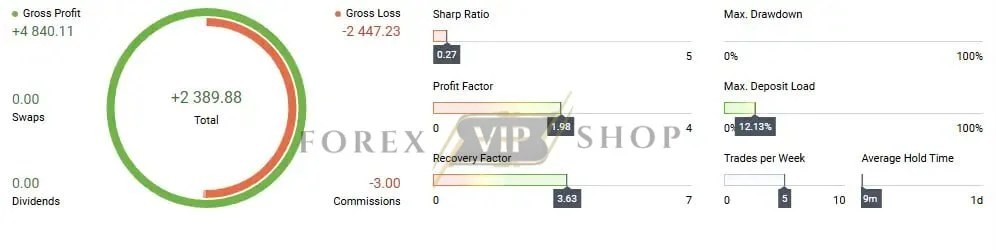
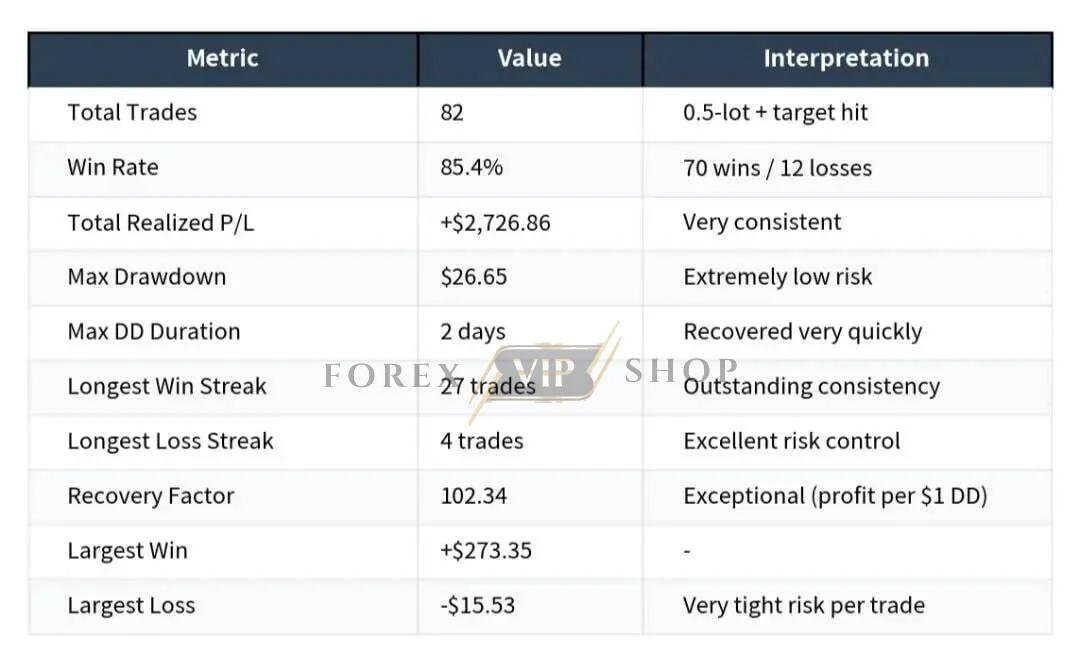
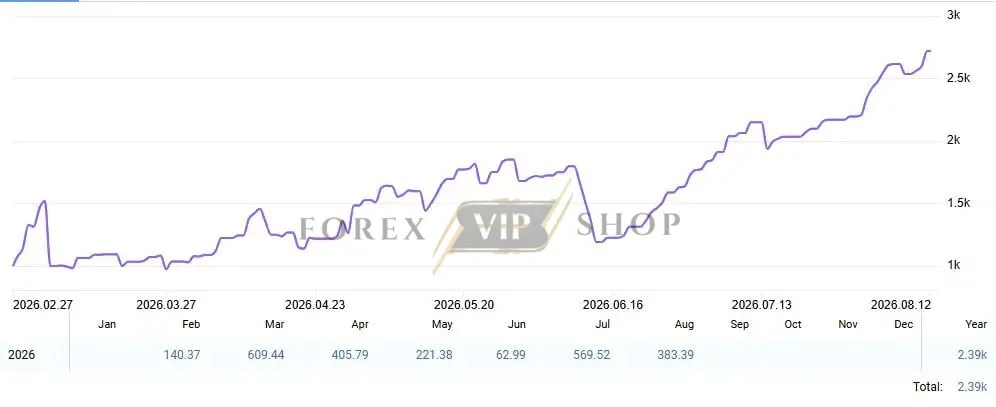
One seller reports 82 trades, 70 wins, an 85.4% win rate, approximately $2,726.86 in realized profit and 5% maximum drawdown. Those figures come from supplied trading records, so I would treat them as reported performance rather than independently verified results.
An 85%+ win rate immediately sounds attractive, but experienced traders know that win rate alone tells us very little.
The crucial questions are:
- What was the average winning trade?
- What was the largest losing sequence?
- How much leverage was used?
- Was Martingale enabled?
- How did the system behave during extreme volatility?
- Were spreads and slippage representative of live trading?
Those questions matter particularly for Gold and Bitcoin.
Risk Management & Drawdown Analysis
This is probably the most important part of the review.
Capital Guard includes several useful risk-management controls, but optional Martingale changes the risk profile considerably. The documentation states that Martingale can be disabled and that maximum-lot protection is available when recovery sizing is used.
My preference would be to begin with fixed-lot or conservative risk-based sizing.
Gold can move sharply around central-bank decisions, inflation data and geopolitical events. Bitcoin can experience even faster percentage movements. A position-sizing method that looks comfortable during normal volatility can become aggressive during an abnormal session.
Therefore, the reported drawdown should never be assumed to represent the maximum drawdown you will experience.
Pros and Cons
Pros
✅ Focused XAUUSD and BTCUSD markets.
✅ Higher H4 timeframe reduces dependence on ultra-fast execution.
✅ Flexible position sizing.
✅ Stop Loss and trailing protection.
✅ Maximum-lot controls.
✅ Session and slippage filters.
Cons
❌ Gold and Bitcoin remain inherently volatile.
❌ Martingale can significantly increase exposure if activated.
❌ Broker spreads and execution can affect results.
❌ Published performance figures are not a guarantee of future performance.
❌ The EA may struggle when breakouts repeatedly fail in ranging markets.
Who Should Use Capital Guard EA MT5?
I would consider it most appropriate for traders who:
- Understand automated Forex trading.
- Prefer H4 systems over aggressive scalping.
- Are comfortable trading Gold or Bitcoin.
- Want configurable money management.
- Have enough capital to use conservative position sizing.
- Are willing to monitor performance and adjust risk when market conditions change.
Who Should Avoid It?
I would avoid using it immediately with real money if you are completely new to EAs.
It is also unsuitable for traders who expect an EA to generate guaranteed monthly profits or who intend to maximize leverage simply because the broker permits it.
Installation & Setup Guide
- Download the Capital Guard EA MT5 .ex5 file and supplied set files.
- Open MT5 and select File → Open Data Folder.
- Place the EA inside MQL5 → Experts.
- Restart MetaTrader 5 and locate the EA in Navigator.
- Attach it to the appropriate XAUUSD or BTCUSD H4 chart.
- Configure risk, lot size, trading hours and protection settings before enabling automated trading.
The published installation instructions similarly recommend placing the EA in the Experts directory and attaching it to the intended chart.
My Opinion After the Evaluation
Capital Guard EA MT5 is interesting because its design is relatively straightforward: identify breakouts, automate execution and provide several controls around position management.
I particularly like the ability to use fixed or risk-based sizing rather than being forced into aggressive recovery trading.
However, I would not buy it because of an advertised win rate alone. The real test is how the EA behaves through losing streaks, failed breakouts, high spreads and unusual volatility.
My approach would be simple: run the recommended H4 configuration on demo first, record drawdown and losing sequences, then consider a small live allocation only if the behavior matches your risk tolerance.
Overall, Capital Guard EA MT5 is worth considering for traders seeking an automated XAUUSD/BTCUSD breakout system, but conservative settings and realistic expectations are essential.
FAQs
01. What is Capital Guard EA MT5?
Capital Guard EA MT5 is an automated MetaTrader 5 Expert Advisor designed around breakout trading, primarily for XAUUSD and BTCUSD.
02. What timeframe does Capital Guard EA MT5 use?
The recommended timeframe is H4 (4-hour) according to the published specifications.
03. Does Capital Guard EA MT5 trade Gold?
Yes. XAUUSD is one of its stated markets. BTCUSD is also supported according to the product documentation.
04. Does Capital Guard EA MT5 use Martingale?
Martingale is described as optional, meaning traders can configure the EA without using recovery-based position sizing.
05. How much money is recommended?
The published recommendation is $1,000 or more, although the appropriate amount ultimately depends on leverage, lot size, broker conditions and risk tolerance.
06. Is a VPS recommended?
Yes. A VPS is recommended for maintaining continuous MT5 operation and reducing interruptions.
07. Is Capital Guard EA MT5 profitable?
No EA can guarantee future profitability. Reported results include an 85.4% win rate and 5% maximum drawdown in supplied records, but these figures should not be interpreted as guaranteed live performance.
👉 Reviewed By: Michael Harrington
Direct Contact And More EAs
- Direct Contact- Telegram: FXVIPShop Support

Reviews
There are no reviews yet.