
Gold Trend X MT5 Settings Guide 2026
If you’re searching for the correct Gold Trend X MT5 settings, understanding what each parameter does is far more valuable than simply copying someone else’s configuration.
Based on the available settings and trading logic, Gold Trend X MT5 appears to be a gold-focused Expert Advisor designed specifically for XAUUSD on the M5 timeframe. The configuration places a strong emphasis on broker compatibility and flexible money management while keeping the setup relatively straightforward.
Rather than exposing dozens of complex inputs, the developer has limited user adjustments to the settings that have the greatest impact on execution and risk management.
➡️ Telegram: Join For NEW Updates & Settings
Download Gold Trend X MT5 here
Settings Overview
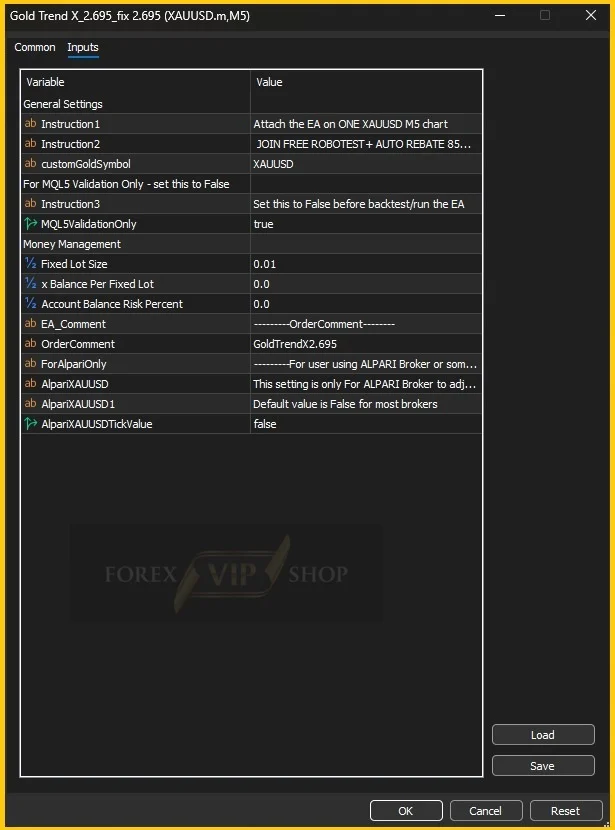
| Parameter | Value | Purpose | Effect on Trading | Risk |
| Instruction1 | Attach the EA on ONE XAUUSD M5 chart | Installation note | Prevents incorrect installation | Low |
| Instruction2 | Join Free Robotest + Auto Rebate | Informational | No trading impact | Low |
| customGoldSymbol | XAUUSD | Trading symbol | Determines traded instrument | Medium |
| MQL5ValidationOnly | true | Validation mode | Used during MQL5 validation/testing | Low |
| Instruction3 | Set this to False before backtest/run | Reminder | Prevents incorrect operation | Low |
| Fixed Lot Size | 0.01 | Fixed trade volume | Controls position size | Medium |
| Balance Per Fixed Lot | 0.0 | Dynamic lot calculation | Disabled at current value | Low |
| Account Balance Risk Percent | 0.0 | Risk-based lot sizing | Disabled | Medium |
| EA_Comment | ——–OrderComment——– | Separator | Organization only | Low |
| OrderComment | GoldTrendX2.695 | Trade identification | Labels open trades | Low |
| ForAlpariOnly | Broker compatibility option | Special broker adjustment | Improves compatibility | Low |
| AlpariXAUUSD | Broker symbol configuration | Symbol adjustment | Broker-specific execution | Low |
| AlpariXAUUSD1 | false | Additional broker option | Disabled | Low |
| AlpariXAUUSDTickValue | false | Tick value adjustment | Disabled | Low |
Detailed Settings Explanation
Custom Gold Symbol
The EA is configured to trade XAUUSD. If your broker uses a suffix such as XAUUSD.a, XAUUSDm, or XAUUSD.pro, this field should be updated accordingly.
Using the wrong symbol prevents the EA from opening trades altogether.
MQL5 Validation Mode
The MQL5ValidationOnly parameter is currently set to true.
The developer clearly indicates that this should be changed to false before running the EA on a live account or performing normal backtesting. This setting is typically included to satisfy MetaTrader Market validation requirements rather than everyday trading.
This is one of the first settings users should verify before installation.
Fixed Lot Size
The EA is currently configured with a 0.01 lot size.
This is generally considered an appropriate starting point for smaller accounts and conservative traders. Increasing this value increases both potential returns and exposure to drawdown.
Beginners often underestimate how rapidly risk grows when moving from 0.01 lots to 0.10 lots on gold.
Balance Per Fixed Lot
This parameter is set to 0.0, meaning automatic lot scaling based on account balance is disabled.
Instead, the EA relies entirely on the manually specified lot size.
Traders who prefer consistent exposure regardless of account growth often leave this disabled.
Account Balance Risk Percent
The risk percentage is also disabled by using 0.0.
If enabled in future versions, this parameter would normally calculate lot sizes automatically according to account equity.
Keeping it disabled gives experienced traders complete manual control over position sizing.
Order Comment
The comment GoldTrendX2.695 is attached to every trade.
Although it doesn’t affect performance, it makes it much easier to identify trades opened by this EA when reviewing account history or running multiple Expert Advisors simultaneously.
Broker Compatibility Settings
Several inputs are dedicated specifically to Alpari brokers.
These include:
- ForAlpariOnly
- AlpariXAUUSD
- AlpariXAUUSD1
- AlpariXAUUSDTickValue
These settings exist because different brokers may quote gold contracts differently or calculate tick values in unique ways.
Most traders using brokers other than Alpari should leave these options unchanged unless instructed otherwise by the developer.
Trading Logic Analysis
From the available configuration, Gold Trend X MT5 appears to be a trend-following gold Expert Advisor rather than a grid or martingale system.
Several characteristics support this conclusion:
- Designed exclusively for XAUUSD
- Optimized for the M5 timeframe
- Simple money management
- No visible grid distance settings
- No martingale multiplier inputs
- No recovery parameters
- Focus on broker compatibility rather than aggressive trade scaling
Although the screenshot doesn’t reveal the internal entry algorithm, the overall structure suggests that the developer intends traders to keep the core strategy unchanged while adjusting only risk-related parameters.
Risk Management
The default 0.01 lot size is suitable for conservative trading.
General recommendations include:
- Start with a balance of at least $500, although larger accounts provide more flexibility.
- Use a VPS if the EA is intended to trade continuously, reducing the risk of missed executions due to local internet interruptions.
- Choose a broker with competitive spreads and reliable execution for XAUUSD.
- Avoid increasing lot sizes too quickly after profitable periods, as gold can experience sharp intraday volatility.
A common mistake is leaving MQL5ValidationOnly enabled, which may prevent normal operation.
How to Apply These Settings
- Open MetaTrader 5.
- Attach Gold Trend X MT5 to a single XAUUSD M5 chart.
- Open the Inputs tab.
- Change MQL5ValidationOnly to false before trading.
- Verify the trading symbol matches your broker’s naming convention.
- Set your preferred fixed lot size and enable AutoTrading.
Optimization Tips
Experienced traders usually adjust the lot size first, as it has the greatest impact on risk.
The trading symbol should only be modified if your broker uses a different suffix or prefix.
Broker compatibility settings should remain at their default values unless you’re specifically trading with Alpari or encounter execution issues.
Avoid changing settings that are intended solely for validation or internal broker compatibility, as doing so can produce unexpected results.
FAQs
01. Is Gold Trend X MT5 only for gold trading?
Yes. The settings indicate that it is specifically configured for XAUUSD.
02. Which timeframe should I use?
The developer recommends attaching the EA to a single M5 chart.
03. Should I disable MQL5 Validation Mode?
Yes. The instructions in the settings clearly state it should be set to false before normal trading or backtesting.
04. Can I increase the lot size?
Yes, but larger lot sizes increase both potential profits and potential drawdown.
05. Do I need a VPS?
A VPS is recommended for uninterrupted execution, particularly if the EA trades around the clock.
06. Are the Alpari settings necessary?
Only traders using compatible Alpari account types typically need to modify those options.
Conclusion
Based on the available configuration, Gold Trend X MT5 settings suggest a streamlined Expert Advisor focused on XAUUSD trading with an emphasis on manual risk control and broker compatibility. The limited number of adjustable inputs indicates that the developer intends traders to concentrate primarily on position sizing while leaving the underlying trading logic intact.
For complete product information, licensing details, updates, and additional documentation, visit the main Gold Trend X MT5 product page.
Useful Links
Contact us via Telegram: @FXVIPShop_Support