
Eyes Storm MT5 Settings Review – Complete Guide for Smart Setup & Performance
If you’re searching for an Eyes Storm MT5 Settings Review, this detailed guide will help you understand how the EA works, how to configure it correctly, and how to get the best performance in real trading conditions.
Many traders install a Forex EA and expect instant results. But the truth is simple — settings decide performance. The same EA can behave safely or aggressively depending on how it is configured.
This article breaks down the Eyes Storm MT5 settings, strategy logic, and practical setup tips in a simple, SEO-friendly way.
🧩 What Is Eyes Storm MT5?
Eyes Storm MT5 is an automated trading robot for MetaTrader 5 designed to trade based on trend-following and price action strategies.
Instead of placing random trades, it focuses on:
- Identifying the market trend direction
- Confirming entries using candlestick patterns
- Managing trades with automatic stop-loss and take-profit
This makes it suitable for traders looking for hands-free trading with structured risk control.
⚙️ Why Settings Matter in Eyes Storm MT5
Many traders fail not because the EA is bad, but because:
- They use default settings blindly
- They don’t understand risk parameters
- They ignore market conditions
With Eyes Storm MT5, settings directly impact:
- Trade frequency
- Risk per trade
- Drawdown levels
- Profit consistency
Understanding the settings gives you full control over performance.
Eyes Storm MT5 DOWNLOAD
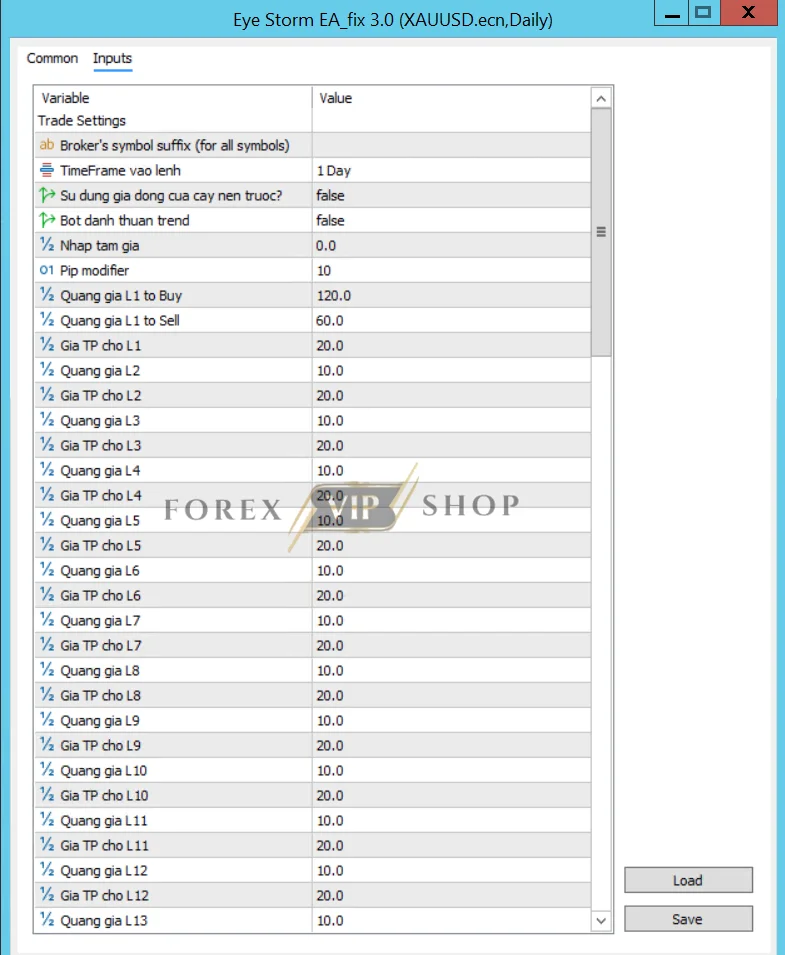
🧩 Eyes Storm MT5 Settings Panel Explained
The settings panel allows traders to customize how the EA trades and manages positions.
🔹 Entry Controls
Start Buy / Start Sell
- Enables buy or sell trades
- You can disable one direction during strong trends
TimeFrame Entry
- Defines the timeframe used for analysis (M5, M15, H1 etc.)
- Lower timeframe = more trades
- Higher timeframe = more stable signals
Use Previous Candle
- Uses the previous candle for confirmation
- Helps avoid false entries
🔹 Grid & Trade Management
Grid Distance (L1, L2, L3…)
- Controls spacing between trades
- Smaller distance = more trades (higher risk)
- Larger distance = fewer trades (safer)
This is one of the most important risk settings.
🔹 Profit Settings
Take Profit (TP)
- Sets the profit target per trade
- Smaller TP = quick exits
- Larger TP = higher reward but longer trades
Close All Button
- Allows instant closing of all trades
- Useful during high volatility or news
🔹 Technical Adjustment
Pip Modifier
- Adjusts pip values based on broker digits
- Important for correct TP/SL calculation
Strategy Behind Eyes Storm MT5
The EA uses a trend-following strategy combined with price action.
How it works:
- Detects the main market trend
- Waits for engulfing candle confirmation
- Opens trades in the trend direction
- Uses dynamic SL & TP to manage risk
This approach helps:
- Reduce random trades
- Capture strong market moves
- Maintain structured trading behavior
📊 Performance Insights (Realistic View)
Eyes Storm MT5 is not a “win every trade” system. Instead, it follows a balanced model:
- Small losses are controlled
- Profitable trades aim to be larger
- Trades are spread across sessions
This is typical for trend-following EAs.
👉 Key idea:
Consistency comes from discipline + settings, not just the strategy.
Join Our Telegram Channel For New Updates
⚙️ Best Settings Approach (Practical Tips)
Instead of chasing “perfect settings”, focus on safe optimization:
✔ Start Safe
- Use low lot size (0.01)
- Avoid aggressive grid spacing
✔ Adjust Based on Market
- Gold (XAUUSD) → use wider grid distance
- Forex pairs → tighter settings possible
✔ Monitor Drawdown
- If drawdown increases → increase grid distance or reduce lot size
✔ Avoid News Trading
- High volatility can break normal EA logic
🚀 Installation Guide (Quick)
- Download the EA file
- Open MT5 → File → Open Data Folder
- Go to MQL5 → Experts
- Paste the file
- Restart MT5
- Attach EA to chart
- Enable Auto Trading
Key Features of Eyes Storm MT5
- Trend-following algorithm
- Engulfing candle entry logic
- Dynamic stop-loss & take-profit
- Automated trade management
- Grid-based recovery system
- Works well on Gold (XAUUSD)
✅ Pros
- Fully automated trading
- Strong trend detection system
- Adjustable risk settings
- Suitable for Gold trading
- Reduces emotional trading
❌ Cons
- Grid system can increase risk if misused
- Needs proper settings optimization
- Performance depends on broker conditions
- Not a “set and forget” EA
🎯 Best For
Eyes Storm MT5 is best for:
- Traders who prefer automated trading
- Users trading Gold (XAUUSD)
- Traders who understand risk management
- Beginners starting with low-risk settings
- Traders using VPS for stable performance
🧩 Common Mistakes to Avoid
Many traders lose because of simple errors:
❌ Using high lot size
❌ Ignoring grid settings
❌ Running EA during news
❌ Not testing on demo first
❌ Using poor broker conditions
Avoiding these mistakes can significantly improve results.
Final Verdict
Eyes Storm MT5 is a well-structured trend-following trading EA that combines price action with automated risk management.
Its strength is not just the strategy, but the flexibility of its settings. When configured properly, it can provide consistent and disciplined trading performance.
However, like any Forex robot, success depends on:
- Proper setup
- Risk control
- Continuous monitoring
If you approach it correctly, Eyes Storm MT5 can be a powerful tool for automated trading in 2026.
FAQs
Q: Is Eyes Storm MT5 good for beginners?
Yes, but beginners should start with low risk settings and demo testing.
Q: Which pair is best?
It performs well on Gold (XAUUSD) due to volatility.
Q: Does it need VPS?
Highly recommended for 24/7 stable trading.
Q: Is it fully automatic?
Yes, it handles entries, exits, and trade management automatically.
Useful Links
DOWNLOAD EA for FREE: Become VIP Member
Contact us via Telegram: @FXVIPShop_Support