

BTC X EA MT5 Settings Guide 2026 – Best BTCUSD Setup
What Are The Best BTC X EA MT5 Settings?
The best BTC X EA MT5 settings depend on account size and risk tolerance. For most traders, reducing Max Open Positions, lowering lot scaling, keeping the ADX filter enabled, and using trailing stop protection creates a more balanced setup. The default configuration is optimized for aggressive growth but can produce significant drawdown during strong Bitcoin volatility.
➡️ Telegram: Join For NEW Updates & Settings
Download BTC X EA MT5 here
Bitcoin moves differently from traditional forex pairs.
A strategy that works perfectly on EURUSD can completely fail on BTCUSD because Bitcoin regularly produces explosive volatility, weekend gaps, and sharp liquidity sweeps.
BTC X EA MT5 was designed specifically for these conditions.
Instead of relying solely on fixed targets, the EA combines trend strength filters, volatility analysis, position scaling, and trailing stop management to follow large Bitcoin movements.
The challenge is that the default settings prioritize opportunity over safety.
Understanding how each parameter affects risk can make the difference between steady growth and account destruction.
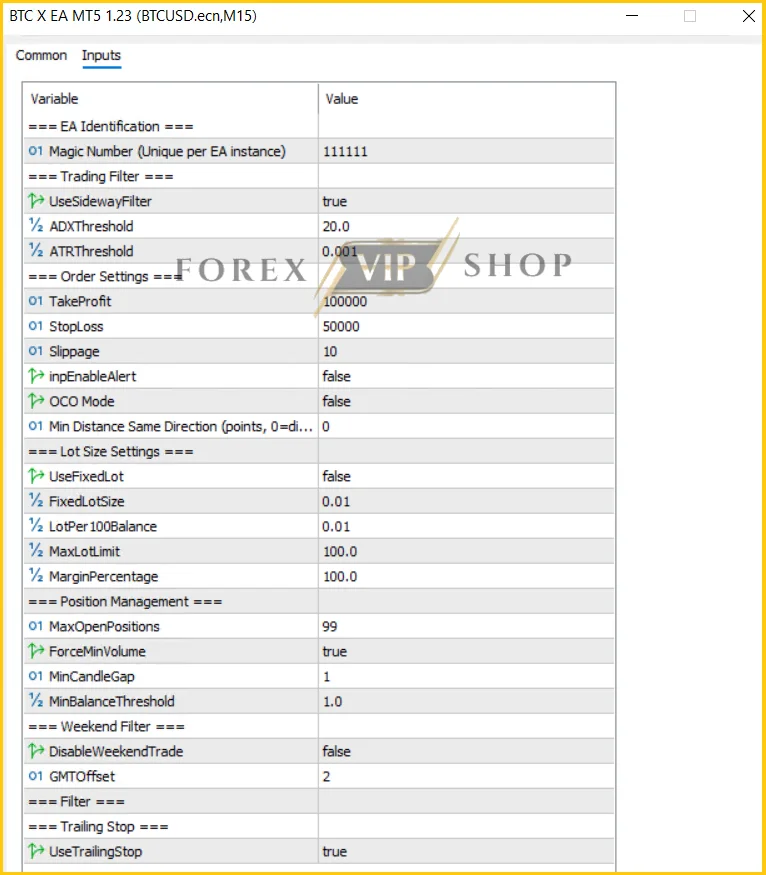
SETTINGS SUMMARY TABLE
| Parameter | Value | Function | Risk Impact |
| Magic Number | 111111 | Trade identification | Low |
| UseSidewayFilter | True | Avoids ranging markets | Low |
| ADXThreshold | 20.0 | Trend strength filter | Low |
| ATRThreshold | 0.001 | Volatility filter | Medium |
| TakeProfit | 100000 | Large profit target | Medium |
| StopLoss | 50000 | Wide stop protection | High |
| Slippage | 10 | Execution tolerance | Low |
| OpenEnableAlert | False | Alerts | None |
| OCO Mode | False | Order management | Low |
| Min Distance Same Direction | 0 | Position spacing | High |
| UserFixedLot | False | Dynamic sizing | Medium |
| FixedLotSize | 0.01 | Fixed lot option | Medium |
| LotPer100Balance | 0.01 | Lot scaling | High |
| MaxLotLimit | 100 | Maximum exposure | Very High |
| MarginPercentage | 100 | Margin usage | High |
| MaxOpenPositions | 99 | Position stacking | Very High |
| ForceMinVolume | True | Minimum lot enforcement | Medium |
| MinCandleGap | 1 | Trade frequency | High |
| MinBalanceThreshold | 1.0 | Scaling trigger | Medium |
| DisableWeekendTrade | False | Weekend trading | Medium |
| GMTOffset | 2 | Broker alignment | Low |
| UseTrailingStop | True | Profit protection | Low |
COMPLETE SETTINGS BREAKDOWN
Magic Number (111111)
This separates BTC X EA trades from manual trades and other EAs.
Without unique identification, trade management conflicts can occur.
UseSidewayFilter = True
This filter attempts to keep the EA out of choppy conditions.
Bitcoin often spends hours moving sideways before explosive moves begin.
The filter reduces unnecessary entries and improves signal quality.
ADX Threshold = 20
The EA only trades when trend strength reaches a minimum level.
ADX≥20ADX \geq 20ADX≥20
Higher values create fewer trades but generally better quality setups.
Lower values increase trade frequency but also increase false signals.
ATR Threshold = 0.001
ATR measures volatility.
ATR>0.001ATR > 0.001ATR>0.001
The EA avoids entering when Bitcoin volatility becomes too weak.
This helps prevent trades during stagnant market periods.
Take Profit = 100000
This setting effectively removes fixed profit targets.
Instead of taking profits quickly, the EA attempts to capture larger trend expansions.
This suggests the trailing stop is doing most of the exit work.
Stop Loss = 50000
The stop loss is intentionally wide.
This gives trades room to survive Bitcoin’s normal price swings.
However, it also means losing trades can become expensive.
LotPer100Balance = 0.01
This is one of the most important settings.
Current scaling logic:
Lot Size=Balance100×0.01Lot\ Size=\frac{Balance}{100}\times0.01Lot Size=100Balance×0.01
As balance grows, position size automatically increases.
Profit potential rises, but so does drawdown exposure.
MaxLotLimit = 100
This ceiling is extremely high.
Most retail traders never need anything close to 100 lots on Bitcoin.
Reducing this value dramatically improves capital protection.
MaxOpenPositions = 99
This setting reveals the true personality of the EA.
A trend-following system alone rarely needs 99 positions.
This suggests position stacking or grid-style expansion behavior under favorable conditions.
Min Distance Same Direction = 0
No spacing restriction means additional trades can appear rapidly.
This boosts profits during strong trends.
It also magnifies losses during reversals.
UseTrailingStop = True
Arguably the most important setting.
The EA appears designed to ride trends and let trailing stops lock profits gradually rather than relying on fixed take-profit targets.
BEST SETTINGS BY ACCOUNT SIZE
Small Accounts ($50–$100)
Not ideal for BTC X EA.
Suggested adjustments:
- Max Open Positions: 3
- Lot Per 100 Balance: 0.005
- Max Lot Limit: 0.10
- Enable trailing stop
Reason:
Bitcoin volatility can wipe out small accounts quickly when multiple positions stack together.
Medium Accounts ($100–$500)
Balanced setup:
- Max Open Positions: 5
- Lot Per 100 Balance: 0.005
- Max Lot Limit: 0.50
This creates a healthier balance between growth and survival.
Growth Accounts ($500–$2000)
Suggested:
- Max Open Positions: 10
- Lot Per 100 Balance: 0.01
- Max Lot Limit: 2
At this size, the account can absorb temporary volatility while maintaining meaningful growth potential.
Large Accounts ($2000+)
Suggested:
- Max Open Positions: 15
- Lot Per 100 Balance: 0.01
- Max Lot Limit: 5
Larger accounts benefit more from stability than excessive leverage.
STRATEGY BEHIND THE SETTINGS
The configuration reveals several important clues.
BTC X EA is not a simple scalper.
It appears to combine:
- Trend filtering (ADX)
- Volatility filtering (ATR)
- Position scaling
- Trailing-stop management
- Multi-position execution
The most interesting detail is the combination of:
- Huge TP
- Huge SL
- 99 maximum positions
- Zero spacing restriction
This indicates the EA expects trends to continue and attempts to build exposure while momentum remains favorable.
That behavior can generate impressive gains during directional Bitcoin markets.
The same logic can create severe drawdowns during violent reversals.
RISK MANAGEMENT
Lot Size Control
The fastest way to reduce drawdown is lowering LotPer100Balance.
Many traders focus on entries.
Professionals focus on exposure.
Control Position Count
Reducing MaxOpenPositions from 99 to 5–10 can dramatically improve survival rates.
Avoid Over-Leverage
BTCUSD volatility already provides enough movement.
Aggressive leverage usually hurts more than it helps.
Common Mistakes
- Using default settings on small accounts
- Increasing lots after wins
- Ignoring weekend volatility
- Running multiple Bitcoin EAs simultaneously
HOW TO APPLY SETTINGS
- Open MT5.
- Copy BTC X EA into Experts folder.
- Restart MetaTrader 5.
- Open BTCUSD chart.
- Select M15 or M30 timeframe.
- Drag EA onto chart.
- Enable Algo Trading.
- Load settings.
- Verify inputs.
- Start automated trading.
ADVANCED OPTIMIZATION TIPS
During High Volatility
Increase ADX threshold slightly.
This forces the EA to trade only stronger trends.
During Choppy Markets
Increase spacing between positions.
This prevents excessive stacking.
For Lower Drawdown
Reduce:
- MaxOpenPositions
- MaxLotLimit
- LotPer100Balance
For More Stable Growth
Use higher timeframes like M30 and H1 instead of chasing every movement on smaller charts.
FAQ
01. Is BTC X EA MT5 suitable for beginners?
Yes, but conservative risk settings are strongly recommended.
02. Which pair should BTC X EA MT5 trade?
BTCUSD is the primary intended market.
03. What timeframe works best?
M15, M30, and H1 are commonly recommended.
04. Why is the take profit so large?
The EA appears to rely more heavily on trailing stop exits than fixed profit targets.
05. Is the default setup aggressive?
Yes. The combination of 99 positions and dynamic scaling creates elevated risk.
06 Should weekend trading be enabled?
Bitcoin trades 24/7, but weekend volatility can increase unpredictability.
07. Can I reduce drawdown?
Yes. Lower lot scaling and position limits first.
08. Does BTC X EA use trend filters?
Yes. ADX and ATR filters are part of its market selection process.
CONCLUSION
BTC X EA MT5 is built for traders who want exposure to Bitcoin’s large directional moves without manually monitoring charts all day.
Its strongest advantage is the combination of trend filtering and trailing-stop profit management.
Its biggest risk comes from aggressive position scaling and the extremely high maximum position allowance.
Traders who simply load the default settings may experience larger drawdowns than expected.
Those who adjust exposure, limit position stacking, and scale lots intelligently can create a far more sustainable long-term setup.
For traders looking to automate BTCUSD trading, the complete package is available here:
Useful Links
DOWNLOAD EA for FREE: Become VIP Member
Contact us via Telegram: @FXVIPShop_Support