
Ghost Scalper MT5 Settings Guide, Analysis & Complete Review
Ghost Scalper MT5 is an automated trading system designed for gold trading on MetaTrader 5. The supplied settings show four modules operating together, each with its own position-sizing controls and magic number.
From a trader’s perspective, the main consideration is exposure management. Four modules set to 0.01 lots do not necessarily mean the account will have only one 0.01-lot position. Multiple modules may trade at the same time, increasing total exposure.
The following guide explains the visible settings without assuming unverified performance results or undocumented trading rules. For additional product information, visit the Ghost Scalper MT5 product page on FXVIPSHOP.
➡️ Telegram: Join For NEW Updates & Settings
Download Ghost Scalper MT5 here
Ghost Scalper MT5 Settings Overview
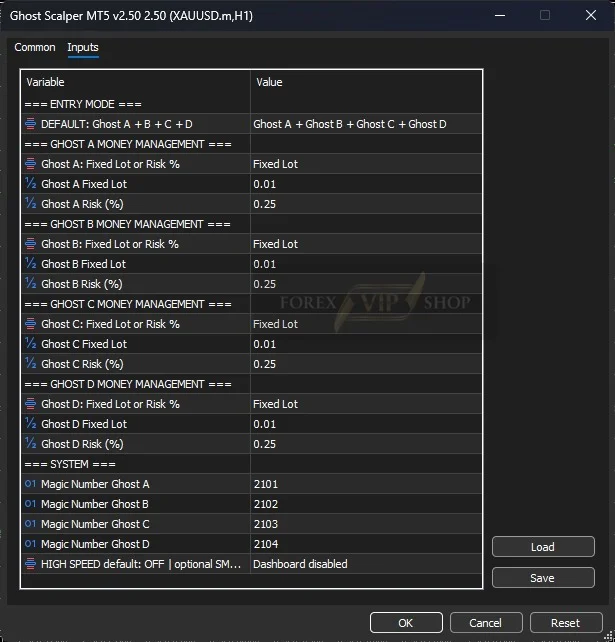
The table below reproduces the values visible in your screenshot.
| Parameter | Value | Purpose | Effect on trading | Risk |
| Entry Mode | Ghost A + Ghost B + Ghost C + Ghost D | Selects the combined entry configuration | Uses all four listed modules | High |
| Ghost A: Fixed Lot or Risk % | Fixed Lot | Selects position-sizing method | Uses fixed volume | Medium |
| Ghost A Fixed Lot | 0.01 | Sets volume for Ghost A | Smallest listed standard lot setting | Medium |
| Ghost A Risk (%) | 0.25 | Alternative percentage-risk input | Relevant if risk mode is selected | Medium |
| Ghost B: Fixed Lot or Risk % | Fixed Lot | Selects position-sizing method | Uses fixed volume | Medium |
| Ghost B Fixed Lot | 0.01 | Sets volume for Ghost B | Adds potential exposure | Medium |
| Ghost B Risk (%) | 0.25 | Alternative percentage-risk input | Relevant if risk mode is selected | Medium |
| Ghost C: Fixed Lot or Risk % | Fixed Lot | Selects position-sizing method | Uses fixed volume | Medium |
| Ghost C Fixed Lot | 0.01 | Sets volume for Ghost C | Adds potential exposure | Medium |
| Ghost C Risk (%) | 0.25 | Alternative percentage-risk input | Relevant if risk mode is selected | Medium |
| Ghost D: Fixed Lot or Risk % | Fixed Lot | Selects position-sizing method | Uses fixed volume | Medium |
| Ghost D Fixed Lot | 0.01 | Sets volume for Ghost D | Adds potential exposure | Medium |
| Ghost D Risk (%) | 0.25 | Alternative percentage-risk input | Relevant if risk mode is selected | Medium |
| Magic Number Ghost A | 2101 | Identifies Ghost A trades | Helps distinguish orders | Low |
| Magic Number Ghost B | 2102 | Identifies Ghost B trades | Separates Ghost B orders | Low |
| Magic Number Ghost C | 2103 | Identifies Ghost C trades | Separates Ghost C orders | Low |
| Magic Number Ghost D | 2104 | Identifies Ghost D trades | Separates Ghost D orders | Low |
| HIGH SPEED default / optional mode | OFF / optional SM… | Shows the displayed speed-related option | Exact mode choices are truncated | Medium |
| Dashboard | Disabled | Indicates the dashboard display is off | Reduces on-chart information | Low |
Risk labels are qualitative assessments of potential trading consequences, not measured risk statistics. The 0.25 values are alternative sizing inputs in this configuration; they do not represent the active lot-sizing method while Fixed Lot is selected.
Detailed Settings Explanation
Entry Mode: Ghost A + Ghost B + Ghost C + Ghost D
This is the central configuration choice. The screenshot shows the combined four-module entry mode, rather than a single Ghost module.
Running all four may provide access to more trading opportunities, but it can also create overlapping positions. Before changing this option, establish whether each module’s entry logic behaves independently and how its trades interact with the others.
Profitability and drawdown: Neither is guaranteed to improve by activating every module. Compare the combined configuration with individual modules using the same test period, spread assumptions, and risk limits.
Fixed Lot or Risk % and Fixed Lot: 0.01
All four modules use Fixed Lot, with each fixed-lot input set to 0.01. This is the active sizing method shown in the image.
Fixed lots make order volume predictable, but the monetary risk is not fixed. The amount lost on a trade depends on its exit price, position size, gold contract specifications, and account currency.
The alternative Risk (%) value is 0.25 for every module. Do not assume that this means each trade risks exactly 0.25% of the account: the current configuration selects Fixed Lot, and the screenshot does not document the EA’s risk-calculation formula.
If you change to percentage-based sizing, verify how the EA calculates risk and whether the percentage applies per trade, per module, or another reference amount.
Magic Numbers: 2101, 2102, 2103, 2104
These values distinguish the four modules’ trades. Keeping the numbers unique helps avoid order-management conflicts.
Retain the different numbers unless the developer specifically advises otherwise. If running multiple EA instances, check for duplicate magic numbers that could cause trade-management confusion.
HIGH SPEED and Dashboard
The screenshot indicates that the dashboard is disabled and that the HIGH SPEED option is off by default, with the remaining text truncated.
The display setting is not a risk-control mechanism. Likewise, a speed-related setting should not be assumed to improve profitability. Check the exact available choices in your own EA version before changing it.
Trading Logic Analysis
The four-module configuration supports classifying Ghost Scalper MT5 as a multi-strategy automated gold trading system. The product’s published description identifies XAUUSD and H1 as its intended market and timeframe and describes selective breakout and momentum trading.
However, the screenshot alone does not prove that the EA uses grid trading, martingale, or recovery logic. Those classifications require evidence from the relevant version’s documentation or verified trading behavior.
For the displayed configuration, the clearest risk is the possibility of simultaneous positions across four modules.
Risk Management: Balance, Brokers and VPS
There is no universally safe minimum balance for this configuration. The appropriate balance depends on gold’s volatility, stop-loss distances, contract specifications, leverage, and the number of simultaneous positions.
Before going live:
- Check combined exposure: Four modules at 0.01 lots each could represent 0.04 lots if all four hold one position simultaneously. Actual exposure may differ with additional positions or different order behavior.
- Avoid assuming a fixed risk: A 0.01 lot position can still suffer a substantial loss during a sharp gold move.
- Check broker conditions: Confirm XAUUSD symbol naming, minimum volume, spreads, commissions, execution quality, and margin requirements.
- Use a VPS: A reliable VPS can help maintain connectivity and reduce interruptions. It cannot eliminate slippage or guarantee execution quality.
- Measure drawdown: Test through trending, ranging, and high-volatility periods. Do not promise or expect a specific drawdown percentage without credible, matching test evidence.
How to Apply These Settings in MT5
- Install Ghost Scalper MT5 in the correct MetaTrader 5 terminal.
- Open the broker’s XAUUSD or equivalent gold chart and select H1.
- Attach the EA and open its Inputs tab.
- Set Entry Mode to Ghost A + Ghost B + Ghost C + Ghost D.
- Confirm Fixed Lot is selected for all four modules and each lot value is 0.01.
- Verify the risk inputs are 0.25 and magic numbers are 2101, 2102, 2103, and 2104.
- Check the HIGH SPEED and dashboard options against the screenshot.
- Enable algorithmic trading only after confirming the settings, then monitor a demo account before considering live use.
Save a copy of the configuration so you can restore it after experiments.
Optimization Tips
Start by testing the four-module configuration against fewer active modules, if the EA version supports that selection. Keep lot sizing and testing conditions consistent so the comparison is meaningful.
Change one variable at a time. Evaluate net results after trading costs, maximum drawdown, trade count, and exposure during volatile gold sessions. Avoid optimizing only for the highest historical profit.
Do not change magic numbers casually, and do not switch to percentage-risk sizing without understanding the EA’s calculation method. Recheck results on unseen data or a separate demo period before relying on an optimized setup.
FAQs
01. What are the best Ghost Scalper MT5 settings?
The supplied configuration is a reasonable starting point for testing: all four modules, Fixed Lot, 0.01 lots each, and distinct magic numbers. It is not a verified optimal or universally safe configuration.
02. Does Ghost Scalper MT5 use 0.25% risk per trade?
Not in the displayed sizing mode. Fixed Lot is selected for all modules. The 0.25 values are alternative risk inputs whose exact calculation is not established by the screenshot.
03. Can all four Ghost modules trade simultaneously?
The combined entry mode selects all four modules. Whether and how often their positions overlap depends on their internal rules and market conditions.
04. Should I increase the lot size?
Not before testing. Larger lots increase monetary exposure, and several active modules can compound that exposure. Evaluate the effect on drawdown before making changes.
05. Which timeframe should I use?
The supplied chart shows XAUUSD on H1, which is consistent with the product’s published recommended setup.
06. Is Ghost Scalper MT5 guaranteed to be profitable?
No. Settings alone cannot establish profitability. Results depend on market conditions, execution costs, EA behavior, and risk management.
Conclusion
The displayed Ghost Scalper MT5 settings use four modules, each configured for 0.01 fixed lots, with separate magic numbers and alternative 0.25 risk inputs. The key decision is whether your account can tolerate the combined exposure when several modules trade at once.
This configuration is best approached as a starting point for structured demo testing—not a guarantee of low drawdown or consistent returns. Review the Ghost Scalper MT5 product page for further product details before proceeding.
Useful Links
Contact us via Telegram: @FXVIPShop_Support