

Description
ToTheMoon MT4 Review
Finding an automated trading system that looks good in a backtest is easy. Finding one whose risk you actually understand is much harder.
That is particularly true with grid-based Expert Advisors.
ToTheMoon MT4 takes a different approach from a conventional one-trade-at-a-time Forex robot. It uses grid positioning, averaging and partial closing to manage a basket as price moves.
I reviewed its strategy structure, available presets, published trading information and current product specifications. My main conclusion is simple: ToTheMoon MT4 is interesting, but its recovery-based design makes risk management more important than its headline win rate.
The developer’s MQL5 listing currently shows version 3.60 and specifically recommends different presets depending on the desired risk profile.
➡️ Telegram: Join For NEW Updates & Settings
➡️ Vendor’s Website: Here
What Is ToTheMoon MT4?
ToTheMoon MT4 is an automated Forex Expert Advisor designed for MetaTrader 4.
Its core strategy is based on a grid and average-price concept. Instead of immediately accepting a losing trade, the system can add positions as price moves against the basket and attempt to close exposure when the market retraces.
The EA also uses partial closing as part of its basket-management approach. The developer explains that profitable positions can help partially close losing positions.
This is an important distinction.
ToTheMoon isn’t simply a traditional trend-following scalper. Its results depend heavily on the market eventually providing enough retracement for the basket to recover.
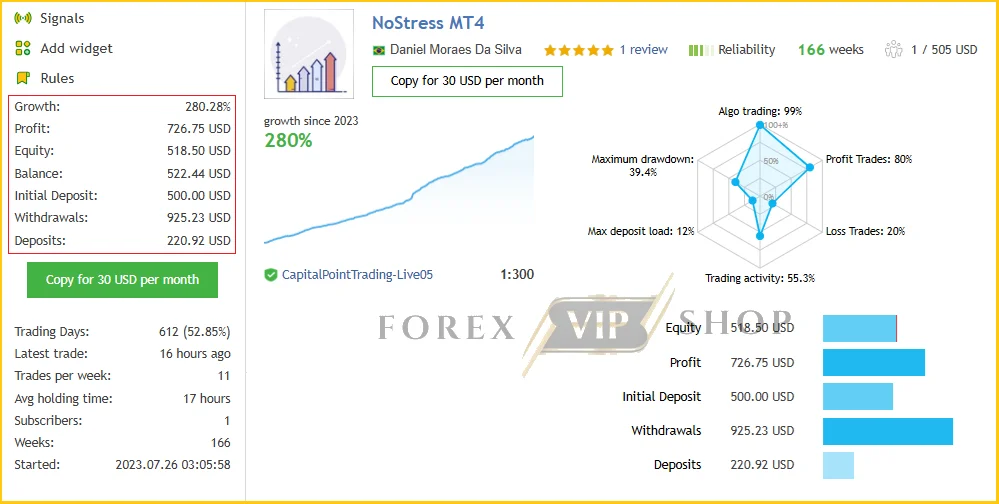
ToTheMoon MT4 Live Signal: Live Link
- Growth: 280.28%
- Profit: 726.75 USD
- Drawdown: 39.4%
- Deposit: 500.00 USD
My Testing & Review Experience
When reviewing an EA like this, I don’t focus only on the percentage of winning trades.
I look at how those wins are produced, what happens during losing periods, and how much open exposure the strategy can accumulate.
What I observed from the available documentation is that ToTheMoon is heavily preset-driven. The developer provides configurations such as NoPain and NoStress, with AUDCAD on M5 being a key example. The published recommendations currently reference approximately $1,200 for NoPain and $600 for NoStress.
That immediately tells me something important.
The advertised $100 minimum should not automatically be interpreted as a comfortable live-trading balance.
A small account may technically run the EA, but grid exposure, lot increases, spread, margin requirements and floating losses can become much more significant as the basket develops.
Public performance records also demonstrate why I would not judge this EA purely from balance growth. A recent 2026 review reported substantially higher equity drawdown than balance drawdown on some ToTheMoon records.
That is the number I would pay attention to first.
How the ToTheMoon MT4 Strategy Works
The basic idea is relatively straightforward:
- The EA opens an initial position.
- If price moves against the trade, additional positions can be opened.
- The basket’s average entry price changes.
- Position sizing can increase depending on the preset.
- When price retraces, positions can be closed.
- Partial closing can help reduce losing exposure.
This approach can work well when markets fluctuate rather than trend aggressively in one direction.
However, the opposite scenario is the major risk.
If the market continues moving against the basket without sufficient retracement, exposure can increase while floating drawdown expands.
The developer itself warns that grid strategies are better suited to instruments that do not follow major trends, and specifically highlights AUDCAD as a preferred example.
Key Features
✅ MT4 automated trading with preset-based configuration
✅ Grid and average-price strategy
✅ Partial-close / basket management
✅ M5 trading
✅ Multiple Forex pairs supported
✅ Preset files available
✅ Multi-symbol capability
✅ VPS-friendly operation
✅ MT5 version available separately
✅ Free lifetime updates, according to the supplied product specifications
One particularly useful feature is the preset system. The developer provides predefined configurations because manually creating a suitable strategy from the EA’s many parameters can be complicated.
ToTheMoon MT4 Specifications
| Specification | Details |
| Platform | MetaTrader 4 |
| Strategy | Grid / Average Price + Partial Close |
| Account Type | Standard/ECN-compatible depending on broker |
| Currency Pairs | AUDCAD, AUDUSD, EURUSD, GBPUSD, USDCAD, NZDUSD |
| Main Timeframe | M5 |
| Recommended Minimum Initial Deposit | $100 stated minimum; higher balances recommended for specific presets |
| Recommended Leverage | Around 1:100+; exact requirement depends on preset/broker |
| Broker Environment | ECN / STP recommended |
| Trading Session | All sessions |
| VPS | Recommended for continuous operation |
| Updates | Free lifetime |
| Support | Telegram support |
The developer’s public listing gives specific capital requirements for its NoPain and NoStress AUDCAD presets, which are considerably higher than the generic $100 minimum.
Performance Observations
There are some encouraging public records surrounding ToTheMoon, but they need context.
One product listing reports a real-account example with approximately 127% growth, a 73.8% win rate and 5.8% maximum drawdown, while another NoStress example reports 172% growth, 80% win rate and 39.4% drawdown.
Those numbers tell two very different stories.
The second example is particularly important because a high win rate doesn’t necessarily mean low risk.
A recent independent review also highlighted the difference between balance drawdown and equity drawdown in public ToTheMoon records.
For me, this reinforces a basic rule:
Never evaluate a grid EA using win rate alone.
Floating drawdown, maximum exposure, margin usage and the behavior of the strategy during prolonged trends matter much more.
Risk Management & Drawdown Analysis
This is where I would be most cautious with ToTheMoon MT4.
The strategy needs price to eventually move back toward the basket’s average price. That makes market conditions extremely important.
Potential risks include:
- Increasing exposure during adverse moves
- Large floating drawdown
- Margin requirements increasing unexpectedly
- Strong one-directional trends
- Spread and execution differences between brokers
- Poorly matched preset files
- Using too small an account
- Over-optimizing settings
- Running an old preset with a newer EA version
The developer specifically recommends using presets designed for the same EA version.
I would therefore avoid aggressive manual modifications until the original configuration has been properly tested.
Pros and Cons
Pros
- Easy automated execution
- Well-defined preset ecosystem
- Grid strategy can benefit from market retracements
- Partial closing adds flexibility to basket management
- AUDCAD-focused configurations are clearly documented
- MT4 and MT5 versions are available
- Suitable for VPS-based operation
Cons
- Grid trading naturally carries recovery risk
- Floating drawdown can be substantially higher than balance drawdown
- Small accounts may have limited margin capacity
- Results can vary significantly between presets
- Strong trends can be dangerous
- Not ideal for traders uncomfortable with open losing baskets
Who Should Use ToTheMoon MT4?
I think ToTheMoon MT4 is worth considering for traders who:
- Understand grid and averaging strategies
- Are comfortable monitoring equity drawdown
- Prefer automated M5 trading
- Want preset-based configuration
- Can provide sufficient margin
- Are willing to demo-test before going live
It may be particularly interesting for traders studying AUDCAD M5 grid strategies, since that combination is repeatedly referenced in the developer’s published configurations.
Who Should Avoid It?
I would avoid this EA if you specifically want:
- Fixed-risk single-entry trading
- Very small drawdowns
- No averaging
- No grid exposure
- Simple stop-loss-based risk management
- A robot that can safely handle unlimited trending markets
It is also not something I would put on a tiny live account simply because the software can technically operate with $100.
Installation & Setup Guide
- Install MetaTrader 4 with your preferred ECN/STP broker.
- Copy the ToTheMoon EA into the MT4 Experts folder.
- Restart MT4 and enable AutoTrading.
- Attach the EA to the recommended M5 chart.
- Load the matching preset/set file.
- Check lot size, balance requirements and risk parameters.
- Run it on a demo account first.
- For 24/5 operation, use a stable VPS.
Most importantly, don’t mix an old preset with a newer EA version without checking compatibility.
My Opinion After Reviewing ToTheMoon MT4
ToTheMoon MT4 is more interesting than a typical Forex robot that simply advertises a high win rate.
The strategy is clearly built around grid recovery, averaging and basket management, and there is a meaningful amount of public information available to study.
But I would not call it a low-risk EA simply because some published accounts show modest drawdown.
The biggest lesson from the available records is that equity drawdown matters. A grid strategy can look comfortable while losing positions remain open underneath the balance curve.
My verdict: worth considering for experienced EA traders, but demo testing and conservative preset selection are essential.
If you’re comfortable with grid-based automated trading and understand the possibility of extended floating drawdown, ToTheMoon MT4 deserves a closer look.
FAQs
01. What is ToTheMoon MT4?
ToTheMoon MT4 is an automated Forex Expert Advisor for MetaTrader 4 using grid, averaging and partial-close basket management.
02. What timeframe does ToTheMoon MT4 use?
The main documented configuration uses the M5, or five-minute, timeframe, particularly for AUDCAD presets.
03. Which currency pairs can ToTheMoon MT4 trade?
The supplied configuration lists AUDCAD, AUDUSD, EURUSD, GBPUSD, USDCAD and NZDUSD. Specific presets can determine which instruments are actually traded.
04. Is ToTheMoon MT4 suitable for a $100 account?
The supplied specifications state $100 as a minimum, but the developer’s published NoStress and NoPain examples use approximately $600 and $1,200 respectively. I would therefore treat $100 as a technical minimum rather than a comfortable recommendation.
05. Is ToTheMoon MT4 a grid EA?
Yes. Its documented strategy opens grid positions, seeks an improved average price and uses retracements to close the basket.
06. Does ToTheMoon MT4 have high drawdown risk?
It can. Published results vary considerably, and some public records show substantially higher equity drawdown than balance drawdown. This is one of the most important risks to understand before going live.
07. Does ToTheMoon MT4 require a VPS?
A VPS is recommended if you want continuous automated operation. A stable connection helps prevent interruptions when MT4 needs to manage an active basket.
👉 Reviewed By: Michael Harrington
Direct Contact And More EAs
- Direct Contact- Telegram: FXVIPShop Support

Reviews
There are no reviews yet.