

Description
Night Hunter Pro MT5 Review
Finding a Forex EA that can trade without constantly increasing risk is harder than it sounds.
Many automated trading systems rely heavily on grids, averaging, or aggressive recovery logic. Night Hunter Pro MT5 takes a different approach.
The EA is designed around short-term scalping during quieter market periods. It operates on the M5 timeframe and supports nine Forex pairs.
According to the developer’s current MQL5 listing, it does not use martingale or grid trading and places trades using pending orders with a stop loss.
That immediately makes it interesting to examine.
However, the strategy also has an important dependency: execution quality. Night Hunter Pro requires good brokerage conditions, particularly around spreads and slippage during rollover.
➡️ Telegram: Join For NEW Updates & Settings
➡️ Vendor’s Website: Here
What Is Night Hunter Pro MT5?
Night Hunter Pro MT5 is an automated Forex Expert Advisor for MetaTrader 5.
The developer describes it as a scalping system that uses entry and exit algorithms with filtering methods to identify trading opportunities during calmer market conditions. The recommended timeframe is M5.
One useful design feature is that the EA can manage multiple supported symbols from a single M5 chart, rather than requiring a separate chart for every pair.
The current MQL5 listing shows version 6.74, updated in February 2026 for compatibility with newer MT5 terminal versions.
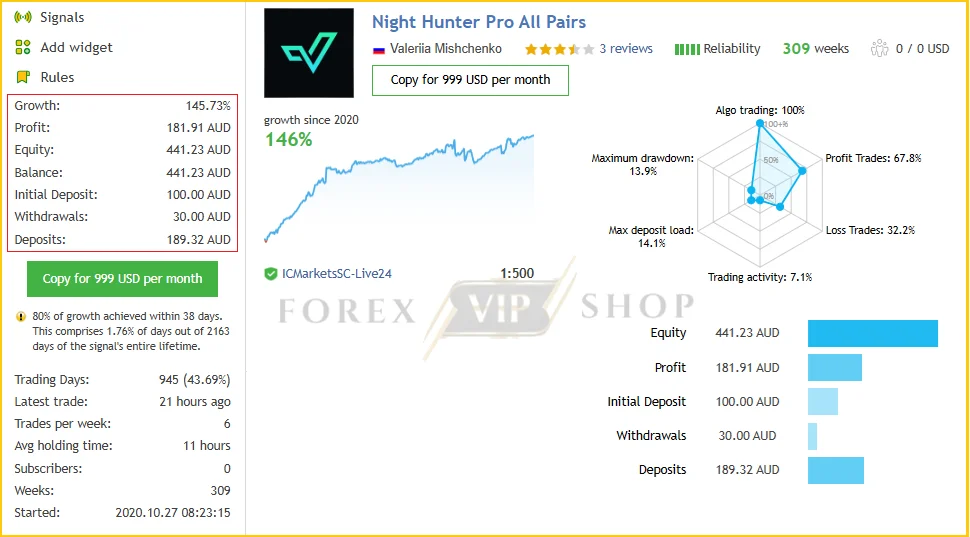
Night Hunter Pro All Pairs Live Signal MQL5: Live Link
- Growth: 145.73%
- Profit: 181.91 AUD
- Drawdown: 13.9%
- Deposit: 100.00 AUD
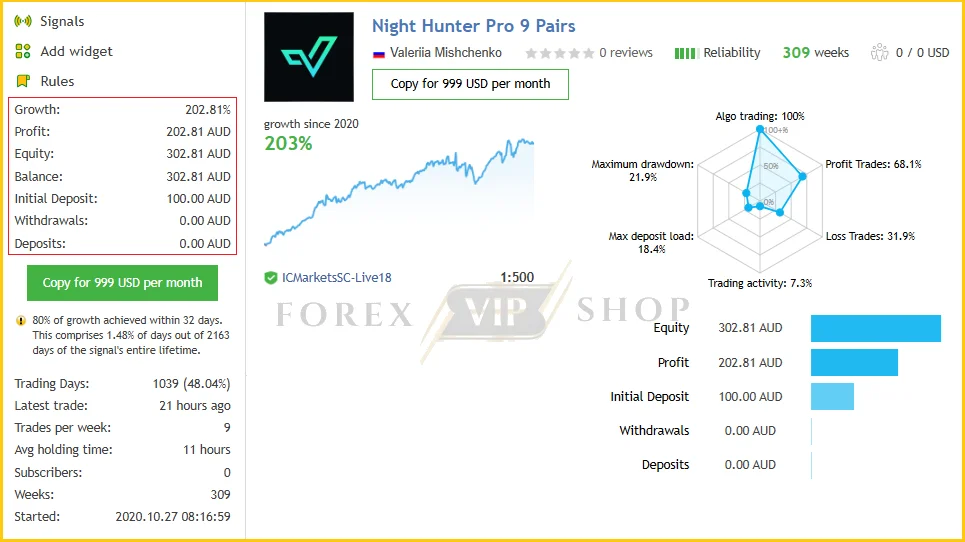
Night Hunter Pro 9 Pairs Live Signal MQL5: Live Link
- Growth: 202.81%
- Profit: 202.81 AUD
- Drawdown: 21.9%
- Deposit: 100.00 AUD
My Testing & Evaluation Experience
When evaluating an EA like Night Hunter Pro MT5, I pay more attention to its underlying trading structure than screenshots showing impressive historical profits.
I could not independently operate a live account through this review, so I won’t pretend that I personally generated a particular return. Instead, I evaluated the current developer information, specifications, strategy description, historical performance claims and user feedback.
What stood out immediately was the absence of grid and martingale logic.
The developer specifically states that the EA uses pending orders and a stop loss for every trade. It also includes controls for maximum drawdown, spread, slippage, position sizing and maximum simultaneous symbols.
That is important because the risk profile of a non-grid system can be very different from an EA that keeps adding positions when a trade moves against it.
However, I would not interpret this as meaning the EA is low-risk. Scalping around rollover can still be affected by spread expansion, slippage and sudden market movements.
How Does the Night Hunter Pro Strategy Work?
The basic concept is relatively straightforward.
Night Hunter Pro looks for opportunities during selected trading periods and uses pending orders rather than simply entering immediately at market.
Its configuration includes a Smart Time Filter, trading-hour controls, rollover protection, swap filtering and a news filter.
The idea is to avoid trading indiscriminately throughout the day.
The system can also automatically detect GMT conditions, while the news filter can suspend trading before and after important economic events.
This is particularly relevant for a night-scalping strategy because spreads and liquidity can change considerably around rollover.
Key Features
✅ M5 scalping strategy — Designed specifically around the five-minute timeframe.
✅ Nine Forex pairs — Supports a diversified selection of major and cross-currency pairs.
✅ No martingale — The developer states that the EA does not use martingale.
✅ No grid — It does not rely on continuously adding positions against the market.
✅ Stop-loss protection — Trades use predefined stop-loss logic.
✅ News filter — Can pause trading around significant economic events.
✅ Rollover filter — Designed to manage the problematic rollover period.
✅ Swap filter — Helps avoid trades exposed to unfavorable swap conditions.
✅ One-chart operation — Multiple supported symbols can be managed from one M5 chart.
Night Hunter Pro MT5 Specifications
| Specification | Details |
| Platform | MetaTrader 5 |
| Timeframe | M5 |
| Account Type | Hedging account |
| Currency Pairs | GBPUSD, EURUSD, EURCHF, USDCAD, USDCHF, CHFJPY, AUDCAD, EURCAD, EURAUD |
| Recommended Minimum Deposit | $50 according to supplied product specifications |
| Leverage | Any |
| Broker Environment | Low spread, low slippage, preferably ECN conditions |
| Live Operation | Continuous operation recommended with VPS |
| Trading Style | Scalping / short-term automated trading |
| Grid | No |
| Martingale | No |
The developer specifically states that a hedging account and good brokerage conditions are required, while continuous VPS operation is recommended.
Performance Observations
Historical results need to be treated carefully.
The reseller product page currently reports a 69-week result of +269%, with a reported maximum drawdown of 15.2% and 70.9% win rate. Those are vendor/reseller-reported figures, not a guarantee of future performance.
The same page presents historical backtests using a $100 starting balance, including tests on EURUSD and GBPUSD.
More importantly, the public MQL5 listing contains mixed user experiences. Some users reported positive long-term results, while others reported disappointing real-account performance or periods when the EA struggled.
That mixed feedback is exactly why I would not judge this EA from a single backtest.
Risk Management & Drawdown Analysis
This is one of the more interesting areas of Night Hunter Pro MT5.
The EA provides controls for:
- Maximum risk per trade
- Fixed or dynamic lot sizing
- Maximum lot size
- Maximum spread
- Maximum slippage
- Maximum simultaneous symbols
- Maximum floating drawdown
- Stop loss
- News filtering
- Rollover filtering
- Swap filtering
The MQL5 documentation confirms that the EA can close positions if floating drawdown exceeds a specified percentage.
Still, no risk-management setting can eliminate execution risk.
For this particular strategy, broker conditions matter considerably. The developer specifically warns that the EA requires low spreads and low slippage, particularly around rollover.
Pros and Cons
Pros
- No grid trading
- No martingale
- Built-in stop-loss approach
- Nine supported Forex pairs
- News and rollover filters
- Automatic GMT detection
- Multiple risk controls
- One-chart multi-symbol setup
- VPS-friendly automated operation
Cons
- Requires a hedging account
- Broker execution quality is important
- Rollover spreads can affect results
- M5 scalping is sensitive to slippage
- Historical performance does not guarantee future results
- Public user feedback is not universally positive
- A $50 minimum should not be confused with a sensible risk-management budget
Who Should Use Night Hunter Pro MT5?
It may be worth considering for traders who:
- Want an automated MT5 scalping system
- Prefer systems without grid or martingale logic
- Have access to a low-spread broker
- Can run MT5 continuously on a VPS
- Understand the risks of short-term automated trading
- Are willing to demo-test the EA before using real capital
Who Should Avoid It?
I would be cautious if you:
- Trade with high spreads
- Frequently experience execution delays
- Use an account type that does not support the EA’s requirements
- Expect consistent profits every day
- Cannot tolerate periods of drawdown
- Want a completely passive “set and forget” system without monitoring
Installation & Setup Guide
- Install MetaTrader 5 with a compatible broker.
- Install the Night Hunter Pro MT5 EA.
- Open an M5 EURUSD chart as the recommended starting chart.
- Enter broker symbol suffixes if your broker uses them.
- Keep the supported currency-pair list correctly configured.
- Enable the required web requests for news/GMT services.
- Configure lot sizing and risk according to your account.
- Run it on a VPS for continuous operation.
- Demo-test the exact broker and settings before going live.
The developer recommends attaching the EA to only one M5 chart, with EURUSD suggested as the chart, while the EA manages its configured symbols internally.
My Opinion After Reviewing Night Hunter Pro MT5
Night Hunter Pro MT5 is interesting because its architecture avoids two common features I generally scrutinize heavily: grid trading and martingale recovery.
The combination of pending orders, stop-loss protection, trading-time controls, news filtering and rollover management gives the system a more structured approach than many aggressive scalping robots.
But there is an important catch.
This is still a short-term strategy operating around periods where spreads and liquidity can change quickly. The developer’s own requirements make broker execution a major part of the equation.
For that reason, I would treat Night Hunter Pro MT5 as an EA worth testing, rather than something that should be trusted blindly with a live account.
A proper demo test using your actual broker, account type and intended risk level is the sensible starting point.
FAQs
01. What is Night Hunter Pro MT5?
Night Hunter Pro MT5 is an automated Forex Expert Advisor designed for M5 scalping across nine supported currency pairs.
02. Does Night Hunter Pro MT5 use martingale?
No. The developer states that the EA does not use martingale or grid trading.
03. What timeframe does Night Hunter Pro MT5 use?
The recommended timeframe is M5 (five minutes). The developer recommends attaching it to one M5 chart, with EURUSD suggested.
04. Which pairs does Night Hunter Pro MT5 trade?
It supports GBPUSD, EURUSD, EURCHF, USDCAD, USDCHF, CHFJPY, AUDCAD, EURCAD and EURAUD.
05. Does Night Hunter Pro MT5 have a news filter?
Yes. The EA includes an advanced news filter that can suspend trading before and after economic events.
06. Does Night Hunter Pro MT5 require a VPS?
A VPS is recommended because the EA is intended to operate continuously.
07. Can I start with $50?
The supplied product specifications list $50 as the minimum/recommended deposit. However, minimum deposit and appropriate trading capital are not the same thing. Risk should be determined by position sizing and acceptable drawdown.
👉 Reviewed By: Michael Harrington
Direct Contact And More EAs
- Direct Contact- Telegram: FXVIPShop Support

Reviews
There are no reviews yet.