

Description
Akali EA MT5 Review
Gold can move extremely quickly, especially when volatility suddenly expands. That creates opportunities for scalpers, but it also creates a difficult problem: execution speed, spread and trade management can make a huge difference.
Akali EA MT5 is built specifically around this environment. It trades XAUUSD on the M1 timeframe and focuses on short-term breakout opportunities combined with a very tight trailing-stop approach.
After reviewing the available product documentation, live-signal information, settings and developer updates, I found an EA with a very specific risk profile. It is not a generic multi-pair robot, and its broker requirements should not be treated as optional.
➡️ Telegram: Join For NEW Updates & Settings
➡️ Vendor’s Website: Here
What Is Akali EA MT5?
Akali EA MT5 is an automated Gold scalping Expert Advisor for MetaTrader 5.
The system is designed exclusively for XAUUSD on M1, rather than spreading its strategy across numerous currency pairs. Its core approach involves identifying price levels and using pending or market execution, followed by tight trailing-stop management.
The developer has also introduced features such as spread and slippage protection, a news filter and a setting that can skip levels that have already been breached. Version 1.41 included fixes relating to news-filter timing and Exness compatibility, according to the developer’s MQL5 updates.
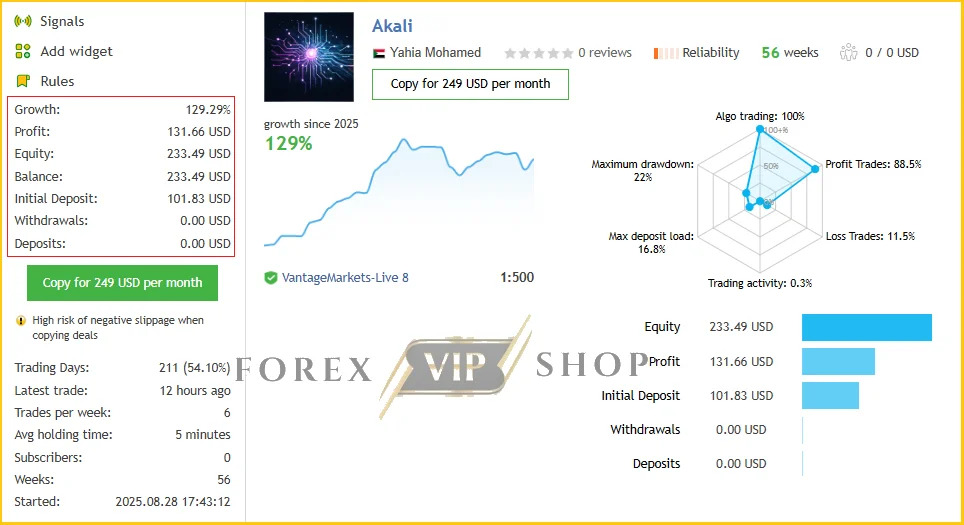
Akali EA MT5 Live Signal MQL5: Live Link
- Growth: 129.29%
- Profit: 131.66 USD
- Drawdown: 22%
- Deposit: 101.83 USD
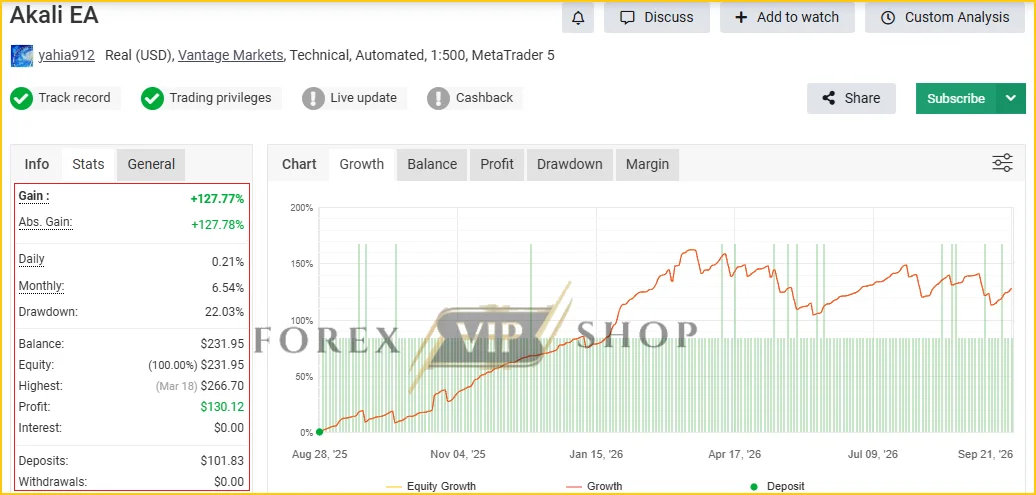
Akali EA MT5 Myfxbook: Live Link
- Gain: +127.77%
- Profit: 130.12 USD
- Drawdown: 22.03%
- Deposit: 101.83 USD
My Testing & Performance Assessment
I want to make one distinction clear: I did not personally run a funded MT5 account with this EA, so I would not present simulated or vendor-published results as my own trading results.
Instead, I assessed the available live-signal data, backtests, configuration information and developer documentation.
The results are interesting, but they need context.
One current product source reports a 123% growth over 54 weeks with 22% maximum drawdown, starting from approximately $101.83.
Another published review reports a backtest with $10,000 starting capital, $21,813 net profit and a 3.25 profit factor. However, that same analysis reports average winning trades of about $133.56 versus average losing trades of about $762.06.
That difference is extremely important.
A high percentage of winning trades can look attractive, but the size of occasional losses matters just as much. This is one reason I would judge Akali by its drawdown and loss structure, not simply by its win rate.
How Does the Akali EA Strategy Work?
The basic concept is relatively easy to understand.
The EA watches the M1 Gold market for levels where a short-term breakout may develop. Depending on the selected execution mode, it can prepare pending orders or monitor the market for direct execution.
After entry, the system relies heavily on its trailing-stop logic.
The tighter trailing mode attempts to protect profits quickly when Gold moves in the expected direction. There is also a wider trailing approach for less aggressive profit protection.
The strategy therefore depends heavily on execution quality.
If spreads become excessive or slippage increases, a strategy using very tight trade management can behave differently from its backtest.
Key Features
✅ XAUUSD-only focus — Designed specifically for Gold.
✅ M1 scalping — Targets very short-term price movements.
✅ Tight trailing stop — Attempts to secure profits quickly.
✅ Pending-order execution — Supports structured breakout entries.
✅ Market execution mode — Available as an alternative execution method.
✅ Spread and slippage controls — Helps avoid unfavorable execution conditions.
✅ News filter — Can pause trading around high-impact USD events.
✅ Level protection — Can skip levels that have already been breached.
✅ Risk-based position sizing — Percentage-based risk options are available.
✅ VPS operation — Important for continuous automated trading.
The developer has continued updating the EA, including fixes to news timing and broker compatibility.
Akali EA MT5 Specifications
| Specification | Details |
| Platform | MetaTrader 5 |
| Trading Symbol | XAUUSD (Gold) |
| Timeframe | M1 |
| Strategy Type | Gold scalping / breakout |
| Account Type | Raw ECN / Low Spread |
| Recommended Minimum Initial Deposit | $100+ reported; $500–$1,000+ is more conservative according to published guidance |
| Recommended Leverage | 1:500 reported in live-signal data |
| Broker Environment | Low spread, good execution and suitable server conditions |
| VPS | Necessary for reliable 24/7 operation |
| Live Operation | Automated |
Published sources differ on the suggested account size, so traders should distinguish between a technical minimum and a sensible operating balance.
Performance Observations
The strongest part of Akali’s available evidence is that there is forward-performance information rather than only historical backtests.
The current product information reports a live signal covering 54 weeks, while the developer’s MQL5 profile also links to a public Akali signal intended to demonstrate performance under live market conditions.
However, the reported 22% maximum drawdown deserves attention.
That is not necessarily a reason to reject the EA, but it tells me that this should not be treated like a low-risk savings product. Gold scalping can experience changing spreads, slippage and sudden volatility.
Risk Management & Drawdown Analysis
This is where I would be most careful.
Akali’s tight trailing approach can generate many relatively small winning trades, while occasional losing trades may be considerably larger. Published backtest data illustrates that imbalance clearly.
The EA also includes practical controls such as maximum spread, maximum slippage, news protection and percentage-based risk settings.
But these controls do not eliminate market risk.
In particular, I would avoid blindly copying a high percentage-risk setting. One published configuration shows 5% risk, which can produce substantial drawdown when losing trades occur.
For that reason, I would test the EA with conservative risk first and evaluate the actual drawdown on the broker account you intend to use.
Pros and Cons
Pros
- Specialized specifically for XAUUSD.
- Designed for M1 Gold scalping.
- Tight trailing-stop management.
- Spread and slippage protection.
- Optional news filtering.
- Public live-performance information.
- Ongoing developer updates.
- Supports automated 24/7 operation with VPS.
Cons
- Gold-only strategy limits diversification.
- Highly sensitive to spread and execution.
- M1 scalping requires reliable VPS connectivity.
- Large individual losses can occur despite a high win rate.
- Reported live drawdown has exceeded 20%.
- Exact proprietary entry and trailing calculations are not fully disclosed.
Who Should Use Akali EA MT5?
Akali may be worth considering if you:
- Specifically want automated XAUUSD trading.
- Understand M1 scalping and execution costs.
- Have access to a Raw ECN or low-spread account.
- Can maintain a reliable VPS.
- Are comfortable monitoring drawdown.
- Prefer automated breakout-style trading.
Who Should Avoid It?
I would be cautious if you:
- Expect consistent profits without meaningful drawdown.
- Trade on high-spread accounts.
- Want a diversified multi-pair EA.
- Have very limited trading capital.
- Are uncomfortable with occasional large losing trades.
- Cannot maintain stable VPS and broker connectivity.
Akali EA MT5 Installation & Setup
- Install MetaTrader 5 and log into your trading account.
- Add the Akali EA to the MT5 Experts folder.
- Open an XAUUSD M1 chart.
- Attach Akali EA and enable Algo Trading.
- Select the recommended set file and review the risk settings.
- Confirm your broker provides low spreads and suitable execution.
- Run it on demo first and monitor spreads, slippage and drawdown.
- Move to live trading only after validating the setup.
The broker’s server time should also be checked carefully, particularly when using the news filter. The developer specifically addressed timing and broker compatibility in version 1.41.
My Opinion After Reviewing Akali EA MT5
Akali EA MT5 is an interesting example of a specialized Gold scalping EA rather than a one-size-fits-all Forex robot.
What stands out to me is the combination of M1 breakout trading, very tight trailing and broker-sensitive execution. Those characteristics can work well in the right environment, but they also make setup quality extremely important.
The biggest point I would not overlook is the loss structure. A high win rate does not automatically mean low risk. The available data shows that significant drawdowns and comparatively large individual losses are possible.
So, rather than treating Akali as a guaranteed profit machine, I would approach it as a specialized automated trading system that deserves demo testing, conservative risk and careful broker selection.
For traders specifically looking for an automated XAUUSD M1 strategy, it is certainly worth researching further.
FAQs
01. What is Akali EA MT5?
Akali EA MT5 is an automated Gold scalping Expert Advisor designed specifically for XAUUSD on the M1 timeframe.
02. Does Akali EA MT5 trade Forex pairs?
Its primary designed market is XAUUSD Gold rather than a broad portfolio of Forex pairs.
03. Does Akali EA MT5 require a low-spread broker?
Yes. Raw ECN or low-spread conditions are particularly important because the EA relies on tight trade management.
04. Does Akali EA MT5 require a VPS?
A VPS is strongly important for continuous 24/7 operation, especially because the EA operates on the M1 timeframe.
05. What is the minimum deposit for Akali EA MT5?
Published sources mention approximately $100+ as a minimum, while another current review recommends $500 minimum and $1,000+ as a more conservative level.
06. Does Akali EA MT5 use a trailing stop?
Yes. Tight trailing-stop management is one of the central components of the strategy.
07. Does Akali EA MT5 have a news filter?
Yes. The developer introduced a high-impact USD news filter, with version 1.41 including timing-related fixes.
👉 Reviewed By: Michael Harrington
Direct Contact And More EAs
- Direct Contact- Telegram: FXVIPShop Support

Reviews
There are no reviews yet.