

Smart Gold Hunter MT5 Settings Guide: Complete Configuration Analysis
Automated gold trading requires more than simply attaching an Expert Advisor to a chart and pressing the AutoTrading button. The quality of an EA depends heavily on how its risk controls, trading profile, and protection features are configured.
Based on the available information about Smart Gold Hunter MT5, this Expert Advisor is designed for traders who prefer a structured XAUUSD approach without aggressive recovery techniques. The system focuses on single-entry trading logic, real Stop Loss and Take Profit management, and risk protection features rather than grid or martingale methods.
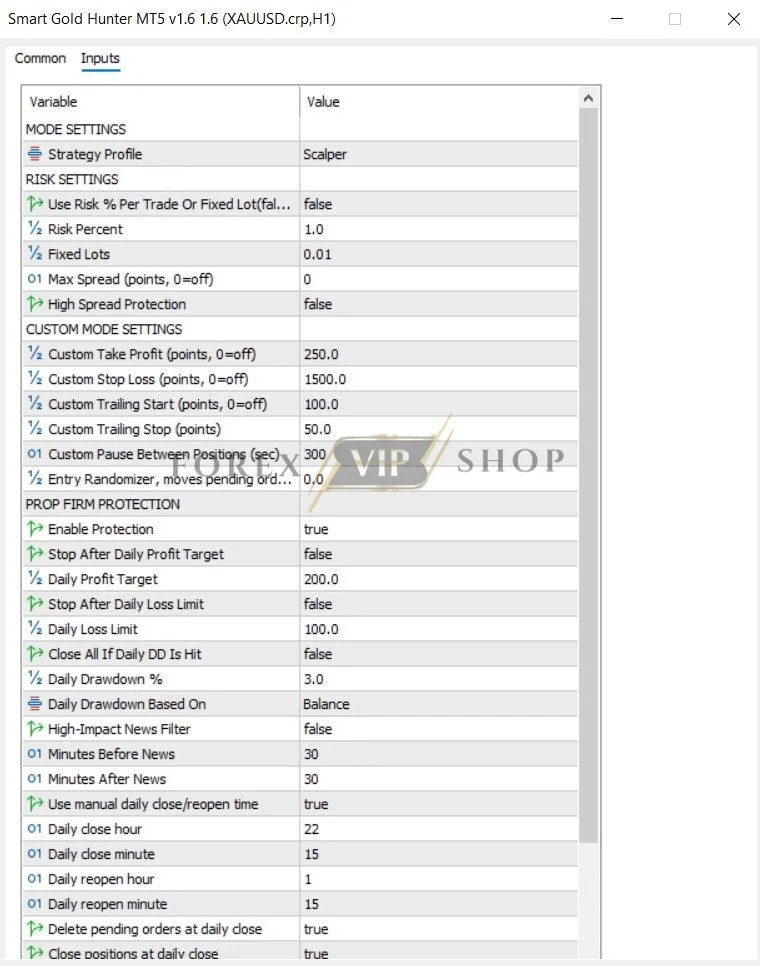
Since the official detailed .set file parameters are not publicly displayed, this guide analyzes the available configuration options and trading controls rather than inventing hidden input values.
➡️ Telegram: Join For NEW Updates & Settings
Download Smart Gold Hunter MT5 here
Smart Gold Hunter MT5 Settings Overview
| Parameter / Feature | Value / Option | Purpose | Effect on Trading | Risk Level |
| Trading Symbol | XAUUSD / Gold | Defines the main market | Allows the EA to focus on gold volatility | Medium |
| Trading Profile | Scalper / Prop Scalper / Balanced / Positive RR / Custom | Changes trading behavior | Adjusts frequency and risk style | Medium |
| Stop Loss Logic | Real Stop Loss | Protects positions from excessive losses | Limits drawdown during bad trades | Low |
| Take Profit Logic | Real Take Profit | Defines exit targets | Controls reward expectations | Low |
| Daily Profit Target | Protection feature | Stops trading after target achievement | Reduces overtrading | Low |
| Daily Loss Limit | Protection feature | Limits daily damage | Controls account risk | Low |
| Equity Protection | Protection feature | Monitors account balance decline | Helps prevent large losses | Low |
| News Filter | High-impact news protection | Avoids unstable market periods | Reduces volatility exposure | Low |
| Spread Protection | Spread monitoring | Avoids poor execution conditions | Helps reduce trading costs | Low |
| Session Close Protection | Trading session control | Avoids unwanted holding periods | Reduces overnight exposure | Low |
| Friday Close Protection | Weekend risk control | Prevents holding before market closure | Avoids gap risk | Low |
Settings above are based on publicly available Smart Gold Hunter MT5 features. Exact input names and default values may vary depending on the EA version.
Detailed Smart Gold Hunter MT5 Settings Explanation
Trading Profile Selection
Smart Gold Hunter MT5 includes different trading profiles designed for different trader objectives. Available profiles include Scalper Mode, Prop Scalper Mode, Balanced Mode, Positive RR Mode, and Custom Mode.
Scalper Mode
This profile appears designed for traders who prefer more active trading behavior. A scalping approach usually attempts to capture smaller gold price movements with quicker entries and exits.
Best suited for:
- Lower spreads
- Fast execution brokers
- VPS users
The main risk is that gold spreads and slippage can strongly affect short-term strategies.
Prop Scalper Mode
The Prop Scalper profile appears designed with funded account trading conditions in mind. Daily loss limits and equity protection become especially important when trading under prop firm restrictions.
Traders should still verify whether their specific prop firm allows automated trading and what restrictions apply.
Balanced Mode
Balanced configuration is generally more suitable for traders who want a compromise between trade frequency and risk exposure.
This type of setting may appeal to beginners because excessive trading activity is reduced compared with aggressive scalping approaches.
Positive RR Mode
A positive risk-to-reward approach focuses on achieving larger potential rewards compared with the amount risked per trade.
This does not guarantee profitability, but it can help create a more structured trading model when combined with disciplined risk management.
Custom Mode
Advanced traders can use custom settings to adjust parameters according to:
- Account size
- Broker conditions
- Trading goals
- Market volatility
Customisation should be approached carefully because changing risk-related parameters can significantly affect drawdown.
Trading Logic Analysis
Based on the available configuration details, Smart Gold Hunter MT5 appears closer to a controlled scalping / hybrid gold trading EA rather than a grid or recovery system.
The main characteristics supporting this conclusion are:
✅ Designed specifically for XAUUSD
✅ Uses real Stop Loss and Take Profit
✅ Avoids grid trading
✅ Avoids martingale position increases
✅ Uses protection systems
✅ Includes different trading profiles
The developer describes the EA as a single-entry, controlled-risk system rather than a strategy based on adding losing positions.
For experienced traders, this design philosophy is important because gold can create sharp directional movements that punish averaging strategies.
Risk Management Recommendations
Recommended Account Balance
The correct balance depends on:
- Lot size
- Risk percentage
- Broker conditions
- Trading profile selected
Avoid running aggressive lot sizes on small accounts. Gold volatility can create larger percentage movements compared with many forex pairs.
Drawdown Expectations
No EA can eliminate drawdown.
Even systems with Stop Loss protection can experience losing periods because:
- Market conditions change
- Gold volatility increases
- Spread expands
- News events create unexpected movements
Always test performance on a demo account before using real funds.
VPS Recommendation
A VPS is recommended for automated trading because it can provide:
- Stable connection
- Lower execution delays
- Continuous operation
This is particularly important for scalping strategies where execution quality matters.
Broker Considerations
For Smart Gold Hunter MT5, traders should prioritize:
✅ Low spreads
✅ Fast execution
✅ Reliable MT5 hosting
✅ Stable gold symbol pricing
Poor broker conditions can negatively affect any gold EA.
How to Apply Smart Gold Hunter MT5 Settings
1️⃣ Install MetaTrader 5
Download and install MT5 from your broker or trading platform provider.
2️⃣ Install the EA
Add Smart Gold Hunter MT5 into your Expert Advisors folder or install through the MQL5 Market.
3️⃣ Open XAUUSD Chart
Attach the EA to your broker’s gold symbol.
4️⃣ Select Trading Profile
Choose a suitable mode:
- Scalper
- Prop Scalper
- Balanced
- Positive RR
- Custom
5️⃣ Configure Risk Settings
Adjust lot size and protection options according to your account.
6️⃣ Enable AutoTrading
Confirm the EA is active and monitor initial trades carefully.
Optimization Tips for Experienced Traders
Experienced users typically adjust:
✅ Risk percentage
✅ Trading profile
✅ Protection settings
✅ Trading sessions
Settings that should rarely be changed without testing:
- Core entry logic
- Stop Loss behaviour
- Safety limits
Market conditions influence performance. A scalping profile suitable during high liquidity periods may behave differently during low volatility markets.
FAQs
01. Is Smart Gold Hunter MT5 a martingale EA?
No. The EA is promoted as using no martingale, no grid, and no recovery trading methods.
02. What market does Smart Gold Hunter MT5 trade?
It is designed mainly for XAUUSD (Gold) trading on MetaTrader 5.
03. Does Smart Gold Hunter MT5 use Stop Loss?
Yes. The EA uses real Stop Loss and Take Profit logic according to its product information.
04. Which Smart Gold Hunter MT5 mode is best?
The best mode depends on your goals. Conservative traders may prefer Balanced Mode, while experienced traders may explore Custom Mode.
05. Can beginners use Smart Gold Hunter MT5?
Yes, but beginners should first test the EA on demo and understand risk settings before using real money.
06. Is a VPS required?
A VPS is not always mandatory, but it is recommended for stable automated execution.
My Honest Idea After The Review
The Smart Gold Hunter MT5 Settings Guide shows a system focused on controlled XAUUSD automation rather than aggressive recovery trading. Its emphasis on Stop Loss protection, multiple trading profiles, and risk management features makes it more suitable for traders who prefer structured automation.
From a trader’s perspective, the most important factor is not simply the EA’s entry strategy but how carefully risk settings are managed. Proper lot sizing, suitable broker conditions, and realistic expectations remain essential.
For complete product details, licensing information, and the latest version, traders should review the main Smart Gold Hunter MT5 product page.
Useful Links
Contact us via Telegram: @FXVIPShop_Support