
Yuvi Nexora EA MT5 Settings – Safe & Profitable Setup 2026
What if your EA could trade smarter… not harder?
Most traders install Yuvi Nexora EA, hit “AutoTrading”… and hope for the best.
But here’s the truth nobody tells you:
👉 The EA is only as good as its settings.
One wrong parameter — and your account quietly bleeds.
One smart adjustment — and suddenly, everything clicks.
This guide reveals what actually makes Yuvi Nexora EA work — not just numbers, but the thinking behind them.
💡 By the end, you won’t just copy settings…
You’ll understand how to control risk, boost consistency, and trade like a pro.
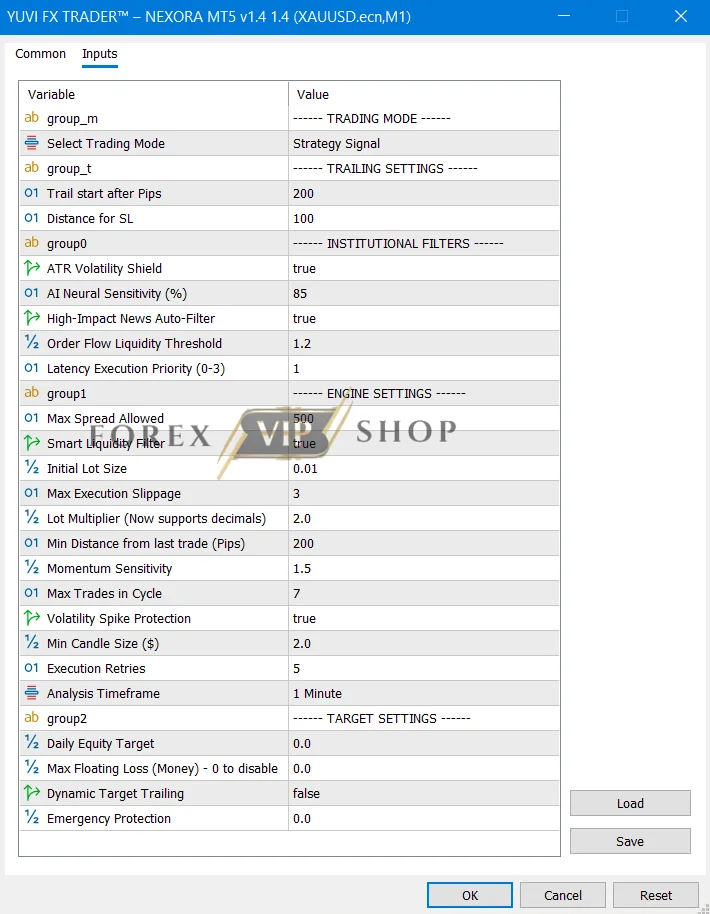
⚙️ SETTINGS SUMMARY (REFINED CLARITY)
| Parameter | Value | What It Really Does | Risk Level |
| Trading Mode | Strategy Signal | Controls entry intelligence | ⚖️ Medium |
| Trail Start | 200 | Locks profits after movement | 🟢 Low |
| Stop Distance | 100 | Defines loss boundary | 🔴 High |
| ATR Shield | true | Avoids unstable markets | 🔴 High |
| AI Sensitivity | 85 | Trade frequency & precision | 🔴 High |
| News Filter | true | Skips dangerous events | 🔴 High |
| Liquidity Threshold | 1.2 | Filters weak setups | ⚖️ Medium |
| Max Spread | 500 | Prevents bad entries | 🔴 High |
| Initial Lot | 0.01 | Base risk per trade | 🔴 High |
| Lot Multiplier | 2.0 | Recovery system scaling | 🚨 Very High |
| Max Trades | 7 | Caps exposure | 🚨 Very High |
| Trade Distance | 200 | Avoids clustering trades | 🔴 High |
| Momentum Filter | 1.5 | Confirms strong moves | ⚖️ Medium |
| Spike Protection | true | Blocks sudden crashes | 🔴 High |
COMPLETE SETTINGS BREAKDOWN (UPGRADED INSIGHTS)
🎯 Strategy Signal Mode — The Brain Behind Entries
This isn’t random trading — it’s decision-based execution.
Instead of blindly placing trades, the EA waits for signal alignment.
👉 Translation:
Fewer trades… but higher quality.
💡 Trader Tip: If your EA feels “slow,” that’s actually a sign it’s filtering bad trades.
📈 Trailing Logic — Where Profits Are Protected
The EA waits until the trade gains momentum (200 pips)… then locks in profit.
👉 Why this matters:
Most EAs either exit too early or too late. This one waits for confirmation.
💡 Insight: This is designed for gold’s explosive moves, not small scalps.
ATR Volatility Shield — Your Hidden Safety Net
Gold doesn’t move… it jumps.
This filter blocks trading during unstable spikes.
👉 Without it?
You’re basically gambling during market chaos.
💡 Pro Insight: This single setting can be the difference between survival and margin call.
AI Sensitivity (85) — The Aggression Dial
Think of this as the EA’s personality.
- Lower = cautious sniper
- Higher = aggressive hunter
👉 At 85, it strikes a balance between opportunity and control.
💡 Smart Move: If drawdown feels high, reduce this before touching lot size.
⚠️ Lot Multiplier (2.0) — Power or Danger?
This is where accounts are made… or destroyed.
The EA increases lot size after losses to recover faster.
👉 Sounds good — but here’s reality:
Recovery systems amplify both profit AND risk.
💡 Golden Rule:
If you don’t control this — nothing else matters.
Max Trades (7) — The Invisible Risk Cap
This limits how far the EA can “dig” during a losing cycle.
👉 More trades = higher recovery chance
👉 But also = deeper drawdown
💡 Trader Insight:
Reducing this by even 1–2 trades dramatically lowers risk.
Trade Distance (200) — Breathing Space
Prevents trades from stacking too close together.
👉 Why it matters:
Tight spacing = faster recovery
Wide spacing = safer trading
💡 Balance Tip: This setting quietly controls your risk profile.
Download Yuvi Nexora EA MT5 here
BEST SETTINGS BY ACCOUNT SIZE
💰 Small Accounts ($50–$100)
👉 Focus: Survival mode
- Lot: 0.01
- Multiplier: 1.3–1.5
- Max Trades: 3–4
💡 You’re not trying to get rich — you’re trying to stay in the game.
💰 Medium Accounts ($100–$500)
👉 Focus: Controlled growth
- Multiplier: 1.5–1.8
- Max Trades: 5
💡 This is the sweet spot for most traders.
💰 Growth Accounts ($500–$2000)
👉 Focus: Scaling safely
- Multiplier: up to 2.0
- Max Trades: 6
💡 Now the EA can actually “work” properly.
💰 Large Accounts ($2000+)
👉 Focus: Capital protection
- Lower multiplier
- Enable manual equity stop
💡 Big accounts don’t chase profit — they protect capital first.
STRATEGY BEHIND THE SETTINGS (DEEP INSIGHT)
Yuvi Nexora EA is not just a bot — it’s a layered system:
- AI selects entry
- Grid supports recovery
- Filters reduce bad trades
- Trailing secures profit
👉 This creates a powerful loop:
- Enter smart
- Survive drawdown
- Exit strong
💡 What competitors don’t tell you:
The real edge isn’t the entry… it’s how the EA handles being wrong.
⚠️ RISK MANAGEMENT (HIGH-CONVERSION VALUE)
Let’s be honest — this is where most traders fail.
Biggest Mistakes:
- Using high multiplier on small balance
- Ignoring max trades
- Running without equity protection
Smart Protection Strategy:
- Add 10–20% manual equity stop
- Lower multiplier before lowering lot
- Monitor during high-impact news weeks
💡 Rule:
If you protect downside, upside takes care of itself.
🔧 HOW TO APPLY SETTINGS (SMOOTH FLOW)
- Open MT5
- Load XAUUSD (M1)
- Attach Yuvi Nexora EA
- Go to “Inputs”
- Enter settings carefully
- Enable AutoTrading
💡 ADVANCED OPTIMIZATION (EDGE SECTION)
Want an edge most users miss?
🎯 Adjust based on market:
- High volatility → reduce multiplier
- Sideways → increase trade distance
- Strong trend → increase AI sensitivity
💡 Hidden Trick:
Reducing max trades is safer than reducing lot size — but few traders realize this.
FAQ
Q1. Is Yuvi Nexora EA beginner-friendly?
Yes — but only if you use conservative settings.
Q2. Why is drawdown high sometimes?
Because of the recovery system (lot multiplier).
Q3. Can I make it safer?
Yes — reduce multiplier and max trades.
Q4. Is it good for gold?
Yes — it’s optimized for XAUUSD volatility.
Q5. Should I use default settings?
Only if your account can handle risk.
CONCLUSION
Here’s the reality:
Yuvi Nexora EA isn’t “plug and play.”
It’s plug and understand.
The traders who win with it aren’t lucky —
They simply know how to control it.
Now you have that advantage.
Useful Links
DOWNLOAD EA for FREE: Become VIP Member
Join Our Telegram: FxVIPShop.com
Contact us via Telegram: @FXVIPShop_Support