
VIGRO PRO EA MT4 Settings – Best Setup for Maximum Profit 2026
What Are the Best VIGRO PRO EA MT4 Settings?
The best VIGRO PRO EA MT4 settings combine multi-timeframe precision, session-based trading, and strict risk control to deliver consistent profits while protecting your account from unnecessary drawdown.
Introduction
What if your EA isn’t the problem… your settings are?
Most traders install VIGRO PRO EA MT4, hit “Auto Trading,” and hope for the best.
Then comes the frustration — inconsistent results, unexpected drawdowns, and missed opportunities.
Here’s the truth:
👉 The real power of this EA is hidden inside its settings.
Once you understand how to control:
- Trade frequency
- Timeframe weighting
- Session timing
- Risk distribution
You stop gambling… and start trading with intention.
In this guide, you’ll discover not just the best settings — but the logic behind them, so you can adapt, optimize, and stay ahead of the market.
👉 Want the full system in action?
Download VIGRO PRO EA MT4 here
⚙️ Quick Settings Snapshot (Why This Setup Works)
Instead of random configurations, this setup is built around one principle:
💡 Trade more when probability is high… and less when it’s not.
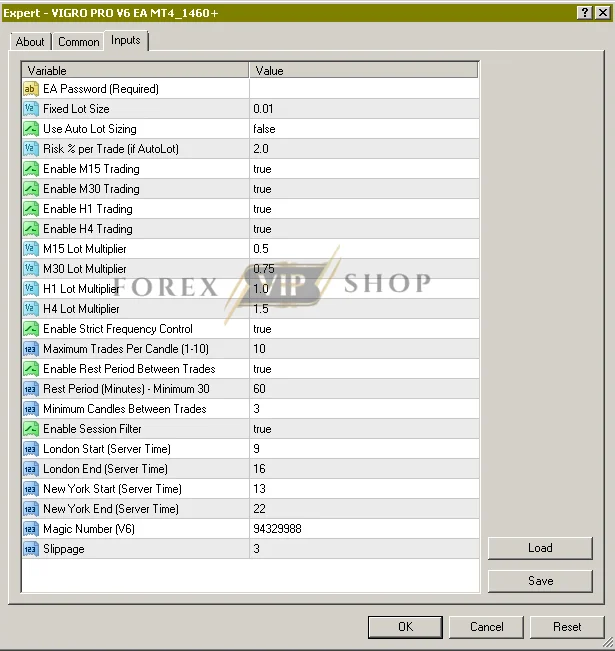
| Parameter | Value | Why It Matters |
| Fixed Lot Size | 0.01 | Keeps risk controlled |
| Auto Lot | Disabled | Prevents overexposure |
| Multi-Timeframe Trading | Enabled | More accurate entries |
| Session Filter | Enabled | Avoids low-quality trades |
| Strict Frequency | Enabled | Stops overtrading |
| Rest Period | 60 min | Prevents revenge trading |
👉 This is not just a setup — it’s a risk-managed trading framework.
Understanding the Settings (Where Profit Is Made)
Let’s break this down like a real trader — not just what settings do, but why they matter.
🎯 1. Lot Size & Risk Control (Your Survival System)
At the core, your account lives or dies by this:
- Fixed Lot Size: 0.01
- Auto Lot: OFF
💡 Why this is powerful:
You eliminate unpredictable risk spikes.
👉 Trader Tip:
Small consistent wins > aggressive growth that wipes accounts.
⏱ 2. Multi-Timeframe Engine (Hidden Edge)
This EA trades across:
- M15 (fast entries)
- M30 (balance)
- H1 (stability)
- H4 (high-confidence trends)
But here’s the twist 👇
Different lot multipliers are applied:
- Lower on M15
- Higher on H4
💡 Meaning:
The EA naturally trusts higher timeframes more.
👉 This is how smart traders scale risk — not randomly, but strategically.
📈 3. Trade Frequency Control (The Silent Account Saver)
- Strict Frequency: ON
- Max Trades per Candle: 10
- Minimum Candles Between Trades: 3
Without this?
The EA becomes a machine gun in a sideways market.
💡 With this?
It becomes selective… calculated… patient.
👉 Trader Tip:
Most blown accounts come from too many trades, not bad trades.
🌍 4. Session Filter (Your Market Timing Advantage)
Trading only during:
- London session
- New York session
💡 Why this matters:
- Higher liquidity
- Stronger trends
- Better execution
👉 Hidden Benefit:
You avoid “dead market traps” where most EAs fail.
⏳ 5. Rest Period (The Discipline You Don’t Have 😏)
- 60-minute cooldown between trades
This mimics something most traders lack:
👉 Patience
💡 Result:
- Fewer bad entries
- Better timing
- Lower drawdown
Best Settings Based on Account Size
Here’s where most guides fail — they give ONE setup for everyone.
That’s wrong.
💰 Small Accounts ($50–$100) – Survival First
- Keep lot at 0.01
- Reduce H4 multiplier
- Lower max trades
🎯 Goal: Stay in the game
💵 Medium Accounts ($100–$500) – Smart Growth
- Use current settings
- Slightly reduce aggressive multipliers
🎯 Goal: Balance growth + protection
📈 Growth Accounts ($500–$2000) – Optimization Zone
- Full settings enabled
- Keep timeframe structure
🎯 This is where the EA performs BEST
🏦 Large Accounts ($2000+) – Stability Mode
- Reduce risk %
- Focus on consistency
🎯 Think like a fund manager, not a gambler
📊 Strategy Behind These Settings (What Most People Miss)
This EA isn’t random — it’s built on a layered strategy system:
👉 Scalping (M15)
👉 Confirmation (M30 + H1)
👉 Trend exploitation (H4)
💡 Combined with:
- Session filtering
- Trade spacing
- Risk scaling
You get a controlled, adaptive trading system.
⚠️ Risk Management (Read This or Regret It)
Let’s be real.
No settings = no protection.
🔢 Golden Rules:
- Never risk more than 2%
- Don’t increase lot size emotionally
- Keep frequency control ON
❌ Biggest Mistakes:
- Turning OFF session filter
- Increasing multipliers blindly
- Overtrading during volatility
💡 Truth:
The EA doesn’t blow accounts… traders do.
🔧 How to Apply These Settings
- Open MT4
- Attach EA to chart
- Go to Inputs tab
- Enter settings
- Enable Auto Trading
💡 Pro Optimization Tips (Advanced Edge)
Want to outperform 90% of users?
👉 Do this:
- Reduce M15 activity during high volatility
- Let H4 trades run during trends
- Increase rest period during choppy markets
Small tweaks = big difference
FAQ
Q1. What are the safest settings?
Low lot size + session filter + strict frequency ON.
Q2. Can beginners use this?
Yes — but stick to conservative settings.
Q3. Is this EA risky?
Only if you misuse lot size and multipliers.
Q4. Why is session filter important?
It avoids low-quality trades and improves accuracy.
Q5. How to maximize profit?
Use balanced settings and adapt to market conditions.
Conclusion
Here’s the difference between traders who win… and those who quit:
👉 Winners control risk and understand their tools
👉 Losers just press buttons and hope
Useful Links
DOWNLOAD EA for FREE: Become VIP Member
Join Our Telegram: FxVIPShop.com
Contact us via Telegram: @FXVIPShop_Support