
✅ Baryonyx Robot Trading MT4 Settings Review
Forex robots often look simple when first installed. Traders attach the Expert Advisor (EA) to a chart, see a settings panel, and assume the default values will work perfectly. In reality, most automated trading systems depend heavily on how their settings are configured.
Baryonyx Robot Trading MT4 is one of those EAs where the settings panel plays a big role in performance. The robot includes controls for lot sizing, risk management, trade execution, and profit handling. Understanding these options helps traders run the EA more safely and effectively.
This article explains the Baryonyx Robot Trading MT4 settings, what the main parameters mean, and how traders can approach them in a smarter way.
✅ What is Baryonyx Robot Trading MT4?
Baryonyx Robot Trading MT4 is an automated trading system designed for the MetaTrader 4 platform. It analyzes market conditions and opens trades automatically based on its internal strategy logic.
Like many modern trading robots, Baryonyx focuses on structured trade entries, risk control, and automated profit management. Instead of relying only on traditional stop-loss and take-profit levels, it may use basket-style profit management and internal exit logic.
Because of this design, the settings panel becomes important for traders who want better control over the EA’s behavior.
✅ Why EA Settings Are Important
Many traders focus only on marketing claims when choosing an EA. However, the settings configuration usually has a bigger impact on real performance.
Different settings can change:
- Risk per trade
- Trade frequency
- Lot size scaling
- Drawdown behavior
- Profit targets
- Spread protection
The same EA may behave conservatively or aggressively depending on how these settings are adjusted.
That is why reviewing the Baryonyx Robot Trading MT4 settings panel is essential before using the EA on a live account.
Baryonyx Robot Trading MT4 DOWNLOAD
✅ Baryonyx Robot Trading MT4 Settings Overview
The settings panel contains several sections that control how the robot operates. These include:
- Identification settings
- Money management
- Profit management
- Trade execution
- Exit logic
- Safety filters
Each of these areas plays a role in shaping the EA’s trading behavior.
✅ Magic Number & Identification Settings
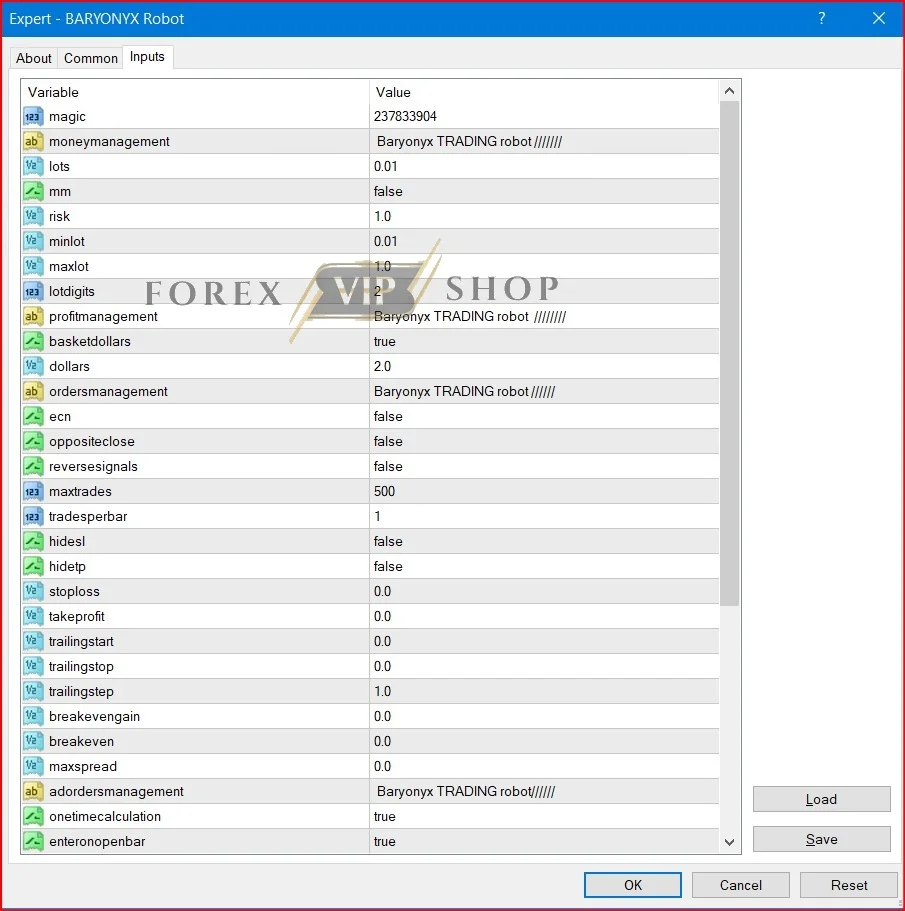
magic = 237833904
The Magic Number helps the EA recognize its own trades.
This is useful when:
- Running multiple EAs on one account
- Trading multiple currency pairs
- Mixing manual trading with automated strategies
Using a unique magic number prevents conflicts between different strategies.
✅ Lot Size & Money Management
Money management settings determine how the EA controls position size and account risk.
lots = 0.01
This sets the starting lot size.
A lot size of 0.01 is the smallest trade size for most MT4 brokers. It is commonly used for:
- Demo testing
- Small trading accounts
- Conservative trading
mm = false
This means automatic money management is disabled.
When this option is off:
- The EA uses fixed lot sizes
- Trade size does not automatically increase with account balance
This makes the robot easier to test and control.
risk = 1.0
This setting becomes active only if money management is enabled. It typically represents the percentage risk per trade.
minlot = 0.01
maxlot = 1.0
These values define the minimum and maximum lot size limits. They help prevent the EA from opening trades outside the allowed size range.
✅ Profit Management Settings
basketdollars = true
This setting indicates the EA may use basket-based profit management.
Instead of closing trades individually, the robot may close multiple positions together once the total profit reaches a certain level.
dollars = 2.0
This value suggests the EA might close the trade basket once total profit reaches $2.
Such a system often aims for:
- Frequent small profits
- Shorter trade duration
- Controlled exposure
However, basket trading should always be tested carefully because it can behave differently under various market conditions.
✅ Trade Entry Settings
The entry settings define how and when the EA opens trades.
tradesperbar = 1
The EA can open only one trade per candle.
This helps prevent excessive trading during volatile price movements.
enteronopenbar = true
This means trades are opened at the start of a new candle rather than randomly during the candle.
Benefits of this approach include:
- More stable signals
- Cleaner backtesting results
- Reduced noise from intrabar fluctuations
maxtrades = 500
This value sets the maximum number of allowed trades.
Although the number looks large, it mainly acts as a limit rather than a target.
✅ Stop Loss & Exit Logic
Exit behavior is one of the most important aspects of any EA.
stoploss = 0.0
takeprofit = 0.0
These values suggest that fixed stop-loss and take-profit levels are not actively used.
Instead, the EA may rely on:
- Basket profit logic
- Internal strategy exits
- Dynamic trade management
trailingstop = 0.0
breakeven = 0.0
Trailing stop and breakeven functions appear disabled in the default configuration.
This means the robot may rely more on its internal strategy logic for closing trades.
✅ Spread & Execution Settings
maxspread = 0.0
Spread filtering appears to be inactive.
If this is the case, the EA may still open trades during high-spread conditions such as:
- Market open
- News events
- Low liquidity sessions
Because of this, using a low-spread broker becomes important.
ecn = false
This option controls how orders are executed with ECN brokers.
If you experience order errors with certain brokers, adjusting this setting may help.
Join Our Telegram Channel For Updates
✅ Recommended Setup Conditions
To use Baryonyx Robot Trading MT4 effectively, traders should consider a few practical setup guidelines.
Use a Demo Account First
Testing the EA on demo allows traders to observe:
- Trade frequency
- Basket behavior
- Drawdown levels
- Exit logic
Use a Reliable Broker
A good broker should offer:
- Stable spreads
- Fast execution
- Strong MT4 support
Consider a VPS
A VPS keeps the trading platform running 24/7, which is important for automated trading systems.
Baryonyx Robot Trading MT4 Review
✅ Pros
- Simple and flexible settings panel
- Supports fixed lot trading for beginners
- Basket profit management option
- Controlled entry logic with one trade per candle
- Compatible with most MT4 brokers
✅ Cons
- Some safety features appear disabled by default
- Spread filtering may not be active
- Exit strategy relies heavily on internal logic
- Requires careful testing before live trading
✅ Best For
Baryonyx Robot Trading MT4 may be suitable for:
- Traders who prefer fixed lot automated trading
- Users who like testing and optimizing EA settings
- Small account traders starting with 0.01 lot size
- Traders who monitor EA performance regularly
It may not be ideal for traders looking for a completely “set-and-forget” trading robot.
✅ Conclusion
Baryonyx Robot Trading MT4 is an EA that looks simple at first but requires careful attention to its settings. The visible configuration shows a robot designed with controlled lot sizes, structured entries, and basket-based profit management.
However, the absence of visible stop-loss and trailing protections means traders should approach it carefully. The safest approach is to start with small lot sizes, demo testing, and gradual adjustments.
When used responsibly and tested properly, the settings panel offers enough flexibility for traders to explore different strategies while maintaining better control over risk.
✅ FAQs
Q: Is Baryonyx Robot Trading MT4 suitable for beginners?
Yes, beginners can use it, especially with 0.01 fixed lot size and demo testing first.
Q: Does the EA use stop loss?
The visible settings suggest the EA may rely more on internal exit logic or basket profit targets instead of fixed stop-loss values.
Q: What is the recommended account size?
Many traders start testing with small accounts ($100 – $500) using fixed lot sizes.
Q: Should I use a VPS with this EA?
Yes. A VPS helps maintain stable 24/7 trading, which is important for automated trading systems.
Q: Can the EA run on multiple charts?
Yes, but using different magic numbers helps avoid trade management conflicts.
Useful Links
DOWNLOAD EA for FREE: Become VIP Member
Contact us via Telegram: @FXVIPShop_Support